Stop Just Checking .com: How to Vet a Domain Name Across Every Extension
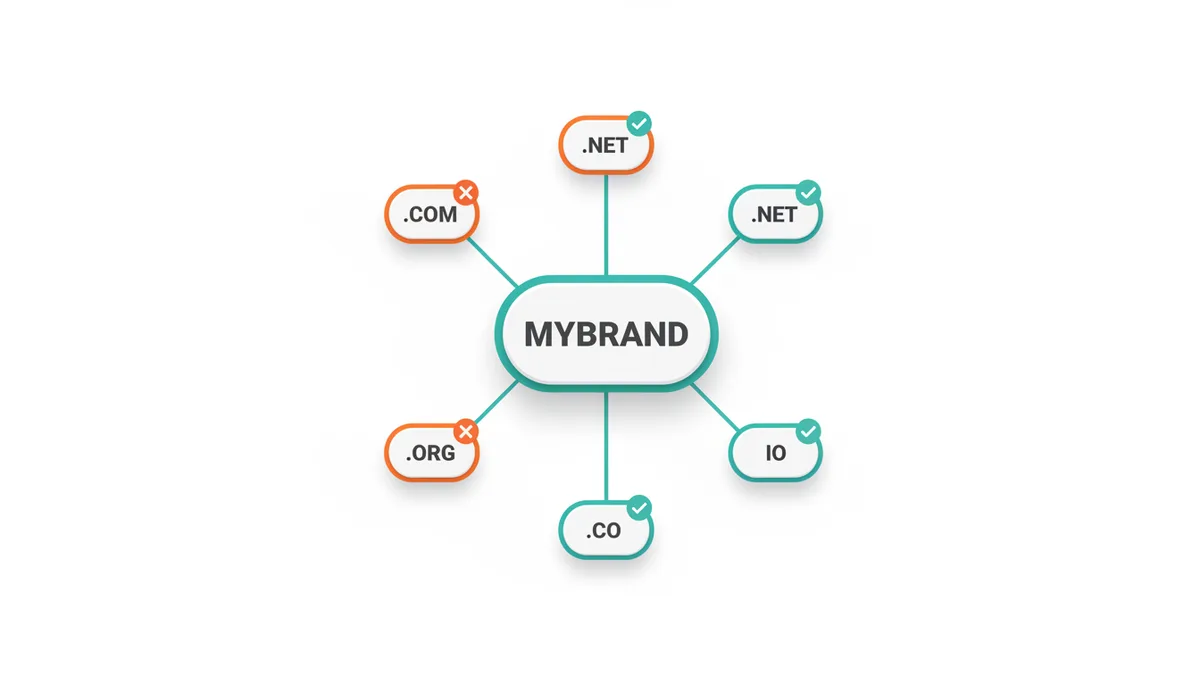
You've spent hours brainstorming the perfect name. It's clever, it's short, and it perfectly captures your new venture. You type it into a domain checker, hold your breath, and... it's available. On .com. You buy it, launch your site, and six months later you get an angry email from a customer who accidentally went to yourbrand.net—a site filled with spammy links that now has your company's name on it. That preventable problem started because you only checked one box.
Checking a domain name across multiple extensions isn't a paranoid exercise for big corporations. It's a fundamental step in securing your online presence. This guide isn't just about which button to click. It's about building a strategy so that when you register your domain, you're not just buying a web address—you're defending a brand.
Why You Should Check More Than Just .com
Thinking stops at .com because it's the default. It's what we've been trained to type. But the Internet hasn't worked that way for over a decade. Ignoring other TLDs (Top-Level Domains, the part after the dot) creates three specific vulnerabilities.
First, you're leaving your brand exposed to cybersquatting. The moment your site gains traction, someone can register yourbrand.net, .org, or .co and set up a competing site, a pay-per-click landing page, or worse, a phishing scam. Legally, you might have recourse, but the process through organizations like WIPO is lengthy, expensive, and stressful. It's far cheaper to spend $15 a year on a defensive registration.
Second, you're losing traffic. A percentage of your audience will mistype your URL. They'll reflexively type .net, .org, or .com.au. If you don't own those common variations, that traffic lands on an error page, a parked domain full of ads, or a competitor. Owning the key alternatives lets you set up automatic redirects, sending every mistyped visitor back to your main site.
Third, you're missing strategic opportunities. A .io extension signals a tech company. A .co.uk tells UK customers you're for them. A .shop can instantly communicate what you do. Your domain extension is part of your branding. Checking across extensions isn't just about defense; it's about finding the right primary home for your project if .com is taken, or augmenting your main site with targeted regional or niche presences.
Understanding the Domain Name Ecosystem
Before you start checking, you need to know what you're checking against. Domains aren't a monolithic database. They're a decentralized, hierarchical system.
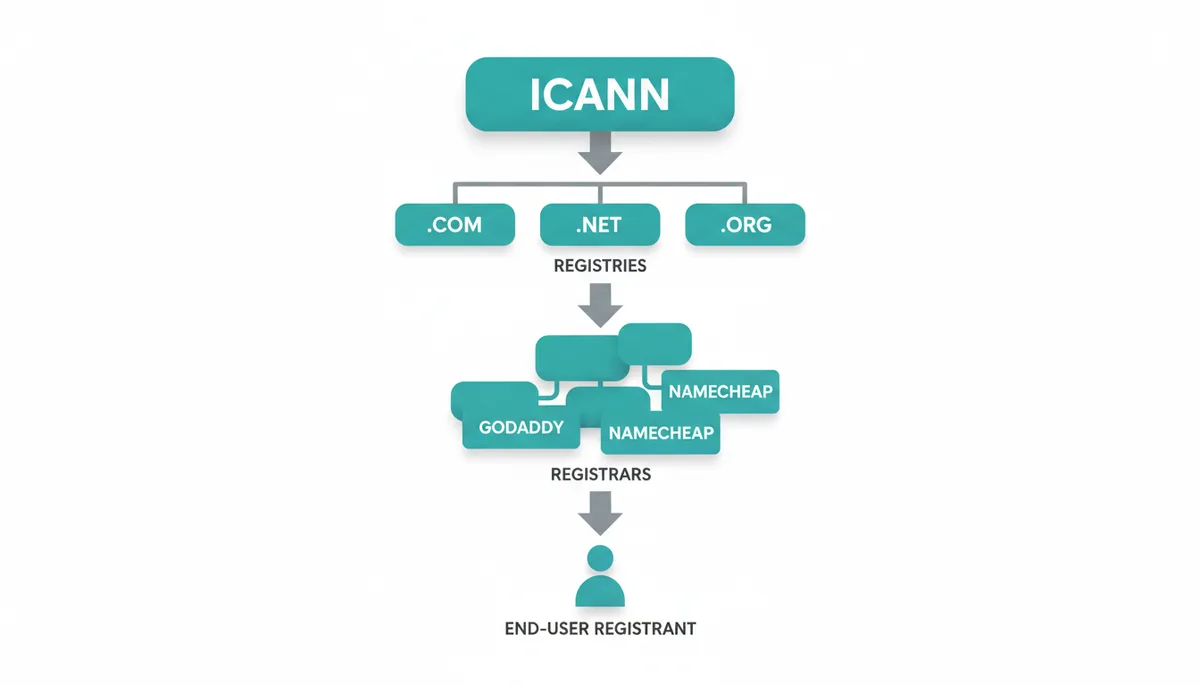
At the top is ICANN, the non-profit that coordinates the global DNS (Domain Name System) and sets policy. ICANN delegates the operation of each TLD (like .com or .de) to a registry operator, such as Verisign for .com. It also accredits the companies you actually buy from—the registrars like GoDaddy or Namecheap.
Here's the chain: ICANN coordinates the system and delegates TLDs to registries. Registries maintain the master database for all domains in their TLD. Registrars are the retail stores; they have agreements with registries to sell domains to you, the registrant. When you check domain availability, the tool is ultimately querying these registry systems to see if a name is in their database. While protocols like WHOIS and its modern replacement, RDAP, are used to get detailed registration data for a taken domain, availability checks themselves are often handled through faster, dedicated registry or registrar APIs.
The extensions themselves fall into categories:
- gTLDs (Generic Top-Level Domains): The classics like .com, .net, .org, .info. Also includes newer ones like .xyz or .online.
- ccTLDs (Country-Code Top-Level Domains): Two-letter codes tied to countries or territories, like .us, .de (Germany), .jp (Japan). Some, like .io (British Indian Ocean Territory) or .tv (Tuvalu), have been repurposed for generic use.
- nTLDs (New Top-Level Domains): Hundreds of extensions launched since 2013, like .app, .blog, .shop, .guru, .lawyer. These are highly specific but can vary in user recognition.
How to Use a Bulk Domain Extension Checker (Step-by-Step)
This is where theory meets action. A bulk checker lets you test one name against dozens or hundreds of TLDs in a single query. Here’s exactly how to do it on a tool like Domain Lookup Tool.
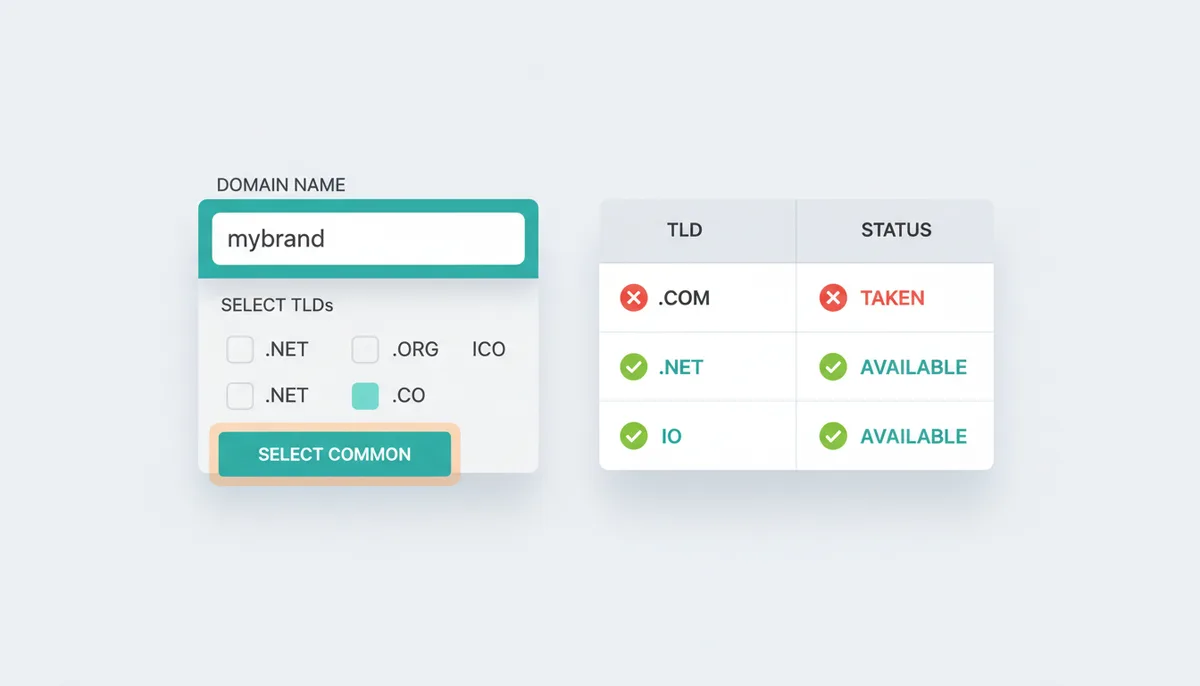
- Enter Your Name, Sans Extension: In the main search box, type only the second-level domain—the "mybrand" part. Do not type .com. You're checking the name itself.
- Select Your TLDs: This is the critical step. Look for a section, often a large checkbox list or a dropdown, titled "Extensions," "TLDs," or "Check all." You'll typically see options to "Select All," "Select Common," or pick by category (e.g., Popular, ccTLDs, nTLDs). For a first pass, click "Select Common." This will check the 10-15 most recognizable extensions.
- Execute the Search: Hit "Check Availability" or "Search." The tool will now send individual queries to each selected registry and compile the results.
Reading the results page is straightforward, but you need to understand the statuses:
- Available: The domain is unregistered. You can usually click to add it to a cart.
- Taken / Registered: Someone else owns it. The result may show a simplified WHOIS snippet (often just "Registered").
- Premium: This doesn't mean "better." It means the registry has reserved this specific name (e.g., a common word like "cloud.app") and is selling it at a significantly higher price, sometimes thousands of dollars per year. It's technically available, but at a cost.
Which Extensions Should You Prioritize in Your Search?
You can't and shouldn't buy everything. You need a tiered strategy based on your brand's size, audience, and budget. Think in these terms:
- Tier 1 (The Must-Have): .com. It's the global standard. If it's free and you can afford it, register it. Full stop.
- Tier 2 (Brand Protection): .net and .org. These are the most common typos and the first places a cybersquatter will look. Add .co if you have the budget—it's often perceived as a company abbreviation.
- Tier 3 (Strategic Fit): This is where your business type dictates the list. A tech startup needs .io. A video creator looks at .tv. A local business needs its country's ccTLD (.ca, .com.au, .co.uk).
Your goal isn't to own the entire internet. For a serious commercial venture, covering the top 3-5 is crucial. Owning 20 is often overkill unless you're a household name. Let your business model guide you.
| Business Type | Primary TLD to Secure | Secondary (Brand Protection) | Niche/Regional Considerations |
|---|---|---|---|
| Global E-commerce Brand | .com | .net, .org, .co | .store, .shop, key ccTLDs for top markets (.de, .fr, .co.uk) |
| Tech/SaaS Startup | .com or .io | .net, .co, .app | .dev, .tech, .ai (if relevant) |
| Local Service Business (e.g., in Canada) | .ca | .com | .services, .city TLD if available (e.g., .toronto) |
| Personal Blog/Portfolio | .com | (Often optional) | .me, .blog, .name |
Interpreting Your Results: A Decision-Making Framework
The checker gives you data. You need to turn that into a decision. Here are the three most common scenarios and how to handle them.
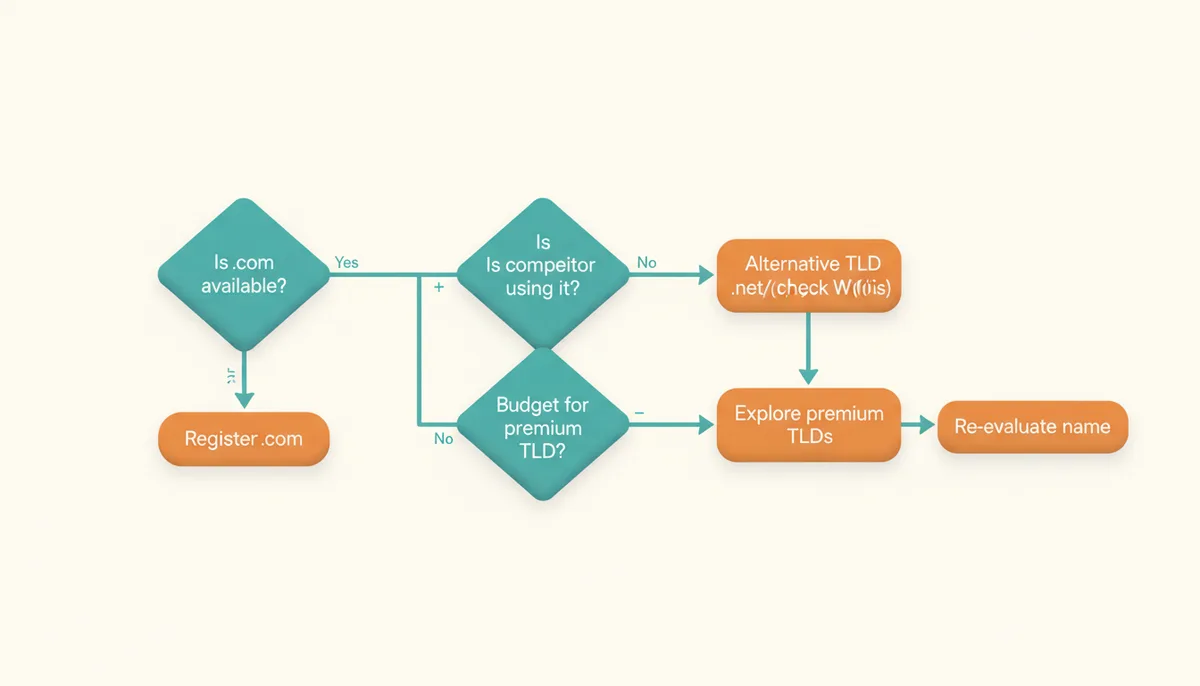
Scenario 1: .com is available. This is the simplest path. Register the .com immediately. Then, evaluate your Tier 2 and Tier 3 list. If your budget allows, register .net and .org right away—it's cheap insurance. For the strategic TLDs, decide if you need them for active use (like a regional site) or just for defensive redirects.
Scenario 2: .com is taken, but .net, .io, etc. are free. Do not panic. You need to investigate the .com. Click any "Whois" link or simply visit the site. What's there? If it's an active, direct competitor in your exact space, choosing a different TLD like .io is fine, but know you'll be competing directly with a .com holder. If it's a parked page, an unrelated business, or a "for sale" landing page, you have a choice. You could proceed with a strong alternative like .co or .io as your primary. Or, you could explore buying the .com from its owner—but expect to pay a premium, often hundreds or thousands of dollars.
Scenario 3: Most major TLDs are taken or listed as premium. This is a clear signal. The name is either too generic (like "cloud.com") or already associated with an established brand. It's time to go back to the drawing board. The cost and complexity of acquiring multiple taken domains or paying annual premium fees is rarely worth it for a new project.
What to Do When Your Ideal Name Is Unavailable
Finding your perfect name taken across the board is more common than not. Don't force a bad name on a weird TLD. Instead, pivot strategically.
Brainstorm Variations: Keep your core keyword but modify it. Add a verb (getmybrand.com, trymybrand.com). Use a prefix or suffix (mybrandhq.com, mybrandapp.com, themybrand.com). Consider abbreviations if they make sense. The goal is to stay memorable and brandable.
Explore the Aftermarket: If you're set on the exact name, you can try to buy it from the current owner. Use a domain broker service—they handle negotiations discreetly. For domains that are about to expire, you can use a backorder service, which attempts to register the domain the millisecond it becomes available. Success isn't guaranteed, and expired domains often go to auction.
Use a Name Generator Tool: This is where a tool's full suite becomes valuable. On Domain Lookup Tool, you can take your core keyword and feed it into the Name Generator. It will suggest semantically related names, check their availability across TLDs in real-time, and show you options you hadn't considered. It turns a dead end into a discovery process.
The Strategic Role of ccTLDs and nTLDs
Beyond .com, .net, and .org lies a world of specific extensions. Used correctly, they're powerful. Used poorly, they look amateurish.
ccTLDs for Geography and Niche: A true ccTLD like .de (Germany) sends a strong geotargeting signal to search engines. Google will more readily show yoursite.de to users searching from Germany. Some ccTLDs have been adopted by global industries: .io for tech, .tv for video/media, .gg for gaming. These carry a "cool factor" but lack the inherent trust of .com.
nTLDs for Specificity and Availability: The new extensions offer incredible availability. You can get a one-word domain like "expert.lawyer" or "portfolio.design." The pro is immediate clarity. The con is user skepticism. Some people still view them as spammy or less legitimate. For a B2B company in a specialized field, a .consulting or .agency TLD can work perfectly. For a mass-market consumer product, it's a risk.
Look at notable examples: Notion uses notion.so (a ccTLD for Somalia, repurposed). Telegram uses telegram.org. These companies made a strategic choice that worked for their brand.
| Extension Type | Primary Use Case | User Trust & Recognition | SEO Signal | Typical Annual Registration Cost |
|---|---|---|---|---|
| .com (gTLD) | Global default, any business | Very High | None (neutral) | $12 - $15 |
| .io (repurposed ccTLD) | Tech startups, developers | High in tech, lower in general public | None (neutral) | $40 - $60 |
| .de (true ccTLD) | Business targeting Germany | Very High within Germany | Strong geotargeting signal for Germany | $10 - $20 |
| .app (nTLD) | App developers, mobile services | Medium (growing) | None (neutral) | $15 - $25 |
Beyond Availability: Final Checks Before You Register
Availability is just the first gate. Before you enter your credit card details, do these three final checks to avoid future headaches.
1. Trademark Search: A domain being available doesn't mean you have the right to use the name. Search trademark databases like the USPTO (for the U.S.) or WIPO's global database. If there's a live trademark for your name in your industry, using it could lead to a costly legal challenge, even if you registered the domain first.
2. Social Media Handle Availability: Your brand exists across platforms. Use a handle checker or manually search key platforms (Twitter, Instagram, Facebook, TikTok, LinkedIn) for your exact brand name. Consistency is ideal. If the .com is free but @yourbrand is taken on every major network, you're creating brand confusion from day one.
3. Check Domain History: Especially for older domains that have dropped and become available again. Use the Wayback Machine at archive.org. Type in the domain and see if it was previously used for spam, adult content, or link farms. Search engines may have penalized the domain, and that history could stick, hurting your new site's ability to rank.
The Hidden Mechanics: What Actually Happens When You Click "Check"
You type "mybrand," select 20 TLDs, and get results in seconds. It feels like a single query. Under the hood, it's a rapid-fire series of distinct negotiations with systems scattered across the globe. Understanding this flow explains why results can lag and where errors creep in.
When you initiate a bulk search, the tool's server doesn't have a master list. It must query the authoritative source for each selected TLD. For common extensions like .com, the tool likely queries a registry's availability system or a registrar's API. For other TLDs, it may use the standard WHOIS or RDAP protocols to ask the registry's database if a name is registered.
The response varies. A simple availability system might return just a yes/no. A WHOIS or RDAP lookup for a taken domain returns a packet of registration data—status, creation dates, the registrar—though privacy rules often mask the owner's contact details. For an available domain, the response typically indicates the name is free.
The delay you might occasionally see is the tool waiting for the slowest source to respond. Some registries, particularly for certain ccTLDs, have slower response times or rate-limit queries. This is why a free checker might limit how many TLDs you can check at once; sending hundreds of simultaneous queries could get the tool's IP address temporarily blocked.
The "Premium" status is a different beast. It doesn't come from a standard availability lookup. Many registries, especially for nTLDs, designate certain names (short words, common phrases) as "premium" and set a higher, often variable price. The checker usually identifies these by cross-referencing the name against a separate premium list or price feed provided by the registry or its partners. That's why the price isn't always shown in the initial results—the tool might only know it's premium, not exactly how much it costs until you try to register it.
A Real, Worked Example: Securing "StellarBake" for a Local Bakery
Let's follow a concrete, hypothetical scenario from start to finish. Sarah is opening "Stellar Bake," an artisanal bakery in Austin, Texas. Her dream domain is stellarbake.com. Here's her strategic process using a bulk checker.
First, she enters "stellarbake" and selects a custom set of TLDs: the common ones (.com, .net, .org, .co), relevant niche nTLDs (.bakery, .cafe), and geographic targets (.us, .tx). She omits .com.au, recognizing it has strict Australian presence requirements she doesn't meet.
The results come back showing a mix of statuses. In her case, let's assume .com, .net, .org, .us, .bakery, and .cafe are available. The .co and .tx extensions are already registered by others.
This is a great starting position. .com is available. Her immediate action is to register stellarbake.com. For brand protection on a local business budget, she also adds .net and .org to her cart. She skips .co since it's taken.
Now, the strategic choices. The .us extension is relevant as a U.S. business, and at a standard price, she registers it to redirect to her main .com site. The nTLDs .bakery and .cafe are intriguing. She registers stellarbake.bakery. She'll use it not for her main site, but for a specific landing page about her bread-making classes. She decides .cafe is redundant for now.
Before checking out, she does her final diligence. A USPTO trademark search shows no active "Stellar Bake" for bakery services. @stellarbake is free on Instagram but taken on Twitter. She opts for @stellarbakeATX on Twitter for consistency. A Wayback Machine check on the taken .co domain shows it was just parked, with no concerning history.
Her total first-year domain cost, using typical promotional prices as an example, might look like: stellarbake.com ($12), .net ($15), .org ($15), .us ($10), .bakery ($20) = about $72. Her strategy gave her a primary global domain, key brand protection, a country-specific redirect, and a niche TLD for a specific marketing purpose—all for a manageable initial investment. Actual prices will vary by registrar and can increase upon renewal.
Edge Cases and Where the Process Breaks Down
The standard bulk check works for 95% of cases. That other 5% will cost you time or money if you're not prepared. These are the scenarios that break the simple "available/taken" model.
1. The Recently Expired (Grace Period) Domain: A checker might show a domain as "taken" when it's actually expired. After a domain expires, it doesn't immediately become available. It enters a grace period (typically 30-45 days for .com) where only the original owner can renew it at the standard price. Then it may enter a "redemption" period. A bulk checker queries the registry, which reports the domain's status as "serverHold" or "pendingDelete." The tool has to interpret this—sometimes it shows "taken," sometimes "expiring." You cannot register it during this time unless you use a backorder service to try and catch it the second it drops.
2. Registry Restrictions and Residency Requirements: Many ccTLDs have strict rules. For example, to register a .ca domain, you must meet a Canadian Presence Requirement (e.g., be a citizen, permanent resident, or corporation in Canada). A bulk checker will show "stellarbake.ca" as "available" because it's unregistered. But when you try to buy it through a registrar, you'll be asked to prove eligibility. If you can't, the registration will fail. Similarly, .eu requires EU residency. Always check the registry's policy page for a TLD you're not familiar with.
3. Domains in "Lock" or Dispute Status: A domain can be locked by the registrar due to a payment dispute, or by a court order as part of a legal case, or by a UDRP (Uniform Domain-Name Dispute-Resolution Policy) proceeding. The registry status might be "clientHold" or "serverTransferProhibited." A checker will simply report this as "taken," with no indication of the lock. You'd only discover this if you attempted a Whois lookup on the specific name and saw the unusual status field.
4. The "Zone File" Delay for New nTLDs: When a brand new nTLD is launched, there's a phased process: Sunrise (for trademark holders), Landrush (premium auctions), then General Availability. During the early phases, the domain might not appear in the central zone file—the master list that tells the global DNS where to find the domain. A bulk checker querying the registry might get a "not found" response, making it seem available, but it's actually reserved for these special periods. This is rare now, but it explains why sometimes a brand-new extension seems to have no domains taken at all.
The takeaway? For any domain that is critical to your core business—especially if it's a ccTLD or an unusual nTLD—don't rely solely on the green "available" indicator. Take the extra step: attempt to add it to your cart at a reputable registrar. If it lets you proceed to payment details (you can stop before charging), you've cleared the final gate. If it throws an error about eligibility or status, you've just saved yourself the frustration of a failed strategy.
Frequently Asked Questions
If I find available domains, can I register them all at once through a bulk tool?
Usually, yes. Most bulk checking tools integrate with a registrar partner. You can select multiple available domains from your results, add them to a single cart, and complete the registration for all of them in one transaction. Remember, each domain is a separate product with its own annual renewal fee.
Do I really need to own the .net and .org if I have the .com?
For a small business or personal project, no. The .com is sufficient. As your brand grows, the risk grows. Securing .net and .org is a relatively low-cost brand protection move—it prevents simple typos from hurting you and blocks the most obvious paths for cybersquatters. I'd register them if your annual domain budget is over $100.
What if a checker says a domain is available, but the registrar says it's taken?
Trust the registrar. Bulk checkers query databases that can be cached by minutes or even hours. A registrar's "add to cart" system communicates directly with the registry's real-time system. If there's a discrepancy, the registry's live status is correct. The domain was likely registered in the window between the checker's last update and your attempt to buy.
How much does it cost to register a name across many extensions?
There's no bundle discount. You pay the sum of each domain's annual fee. A .com might be $15, a .net $18, a .io $50, and a premium nTLD could be $200. Securing .com, .net, .org, and .io would run you about $100 per year, plus the initial registration fees. Country-code TLDs often have higher renewal costs.
Can using a new extension like '.shop' or '.xyz' hurt my SEO?
No, not directly. Google's algorithm treats all gTLDs equally for ranking purposes. The indirect risk is user behavior: if people are less likely to click on a .xyz link in search results because they don't trust it, your click-through rate suffers, which can eventually impact rankings. For a known brand, this matters less. For an unknown site, it's a headwind.
Is it better to get a weaker name on a .com or a great name on a .io?
This is the core trade-off. My rule: if your audience is technical (developers, startups, SaaS buyers), a great .io is better than a compromised, forgettable .com. If your audience is the general public, the inherent trust and memorability of a .com usually wins. "GetButton.com" is almost always better than "TheBestMobileCTASolution.io."
Sources
- ICANN (Internet Corporation for Assigned Names and Numbers) — Definitions of TLD types (gTLD, ccTLD) and the official roles of registries and registrars in the domain name system.
- IANA (Internet Assigned Numbers Authority) — The definitive list of all delegated TLDs, which can be referenced when discussing the variety of extensions available.
- WIPO (World Intellectual Property Organization) — Information on domain name disputes, cybersquatting, and the importance of checking for trademarks before registering a domain.
- Verisign — Data and trends on the growth and prevalence of major TLDs like .com and .net, supporting claims about their market dominance and user recognition.