What a Domain Availability Check Actually Checks
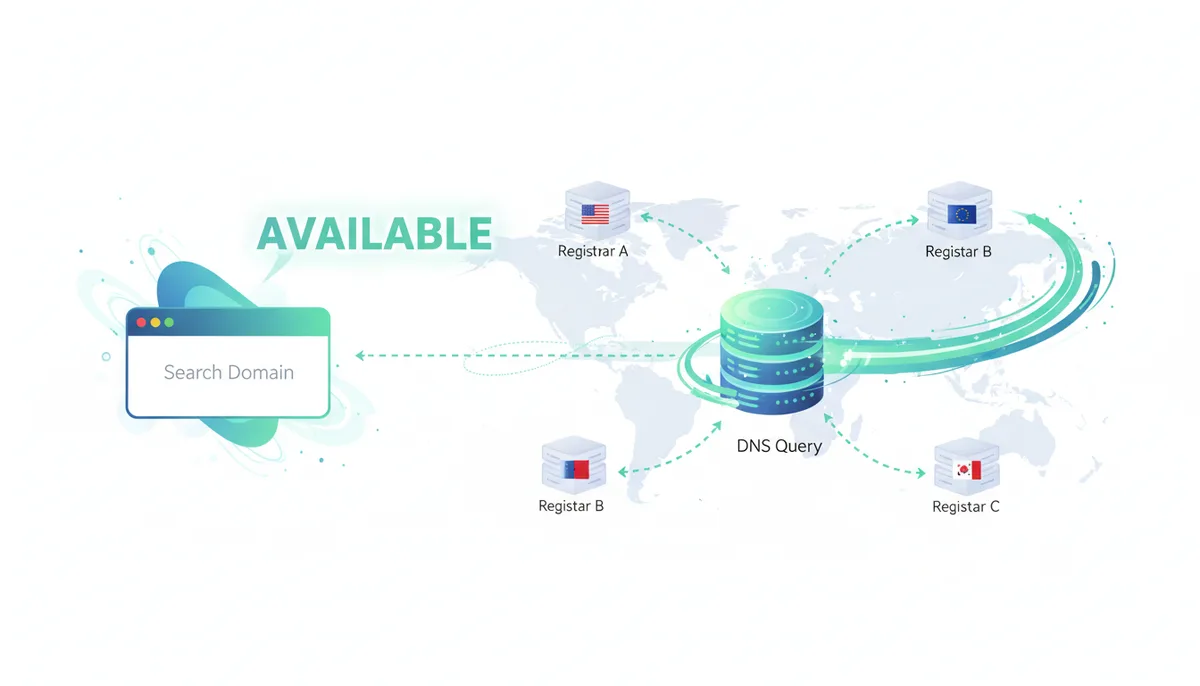
What Really Happens in the Two Seconds After You Click 'Check'?
You've found the perfect domain name for your business. Your fingers hover over the keyboard as you type it into a domain checker. You click 'Check' and within two seconds, you get your answer: Available or Taken. That split-second response feels simple, but you've just triggered a cascade of technical queries that span continents and navigate through multiple layers of internet infrastructure.
This isn't Google searching its index. When you check domain availability, your query travels from your browser to the checker tool's servers, then onward to one of the internet's most fundamental systems: the global domain registry network. Your request might ping servers in Virginia if you're checking a .com domain, or Tokyo for a .jp domain. Each top-level domain has its own authoritative database, and your checker knows exactly which door to knock on.
The journey looks like this: Your browser sends an HTTPS request to the domain checker's API. The checker parses your input—let's say "coffeelovers.com"—and identifies the top-level domain (.com). It then queries the appropriate registry operator (Verisign for .com) using either the legacy WHOIS protocol on port 43 or the modern RDAP protocol over HTTPS. The registry checks its database and responds with structured data about that exact string. The checker interprets this response and translates it into the simple "Available" or "Taken" message you see.
What makes this remarkable is the coordination required. There's no single "domain database" that contains every registered name on the internet. Instead, you're querying a distributed system with over 1,500 different top-level domains, each managed by different organizations, all following protocols that ensure your query gets routed to exactly the right place every time.
Who Are the Official Keepers of Domain Names?
The domain name system operates like a carefully orchestrated hierarchy, with clear separation of powers between those who make the rules, those who manage the databases, and those who sell to the public. Understanding who controls what explains why your domain check works the way it does.
At the apex sits ICANN—the Internet Corporation for Assigned Names and Numbers. Think of ICANN as the constitutional authority of domain names. They don't manage any domains directly, but they set the policies that everyone else must follow. They decide which organizations can operate new top-level domains, establish the technical standards for domain management, and enforce the contracts that keep the system running smoothly.
Below ICANN are the Registry Operators—the actual database managers. Verisign operates the authoritative database for .com and .net domains. Nominet runs .uk. Public Interest Registry manages .org. Each registry maintains the master database for its assigned top-level domains. When you check if "example.com" is available, you're ultimately querying Verisign's database, not some generic internet directory.
Registries don't sell domains directly to the public. That's where Registrars come in—companies like GoDaddy, Namecheap, or Cloudflare. Registrars are accredited by ICANN and have contracts with various registries. They provide the user-friendly interfaces, shopping carts, and customer support. When you buy a domain through a registrar, they communicate with the appropriate registry to insert your registration into the authoritative database.
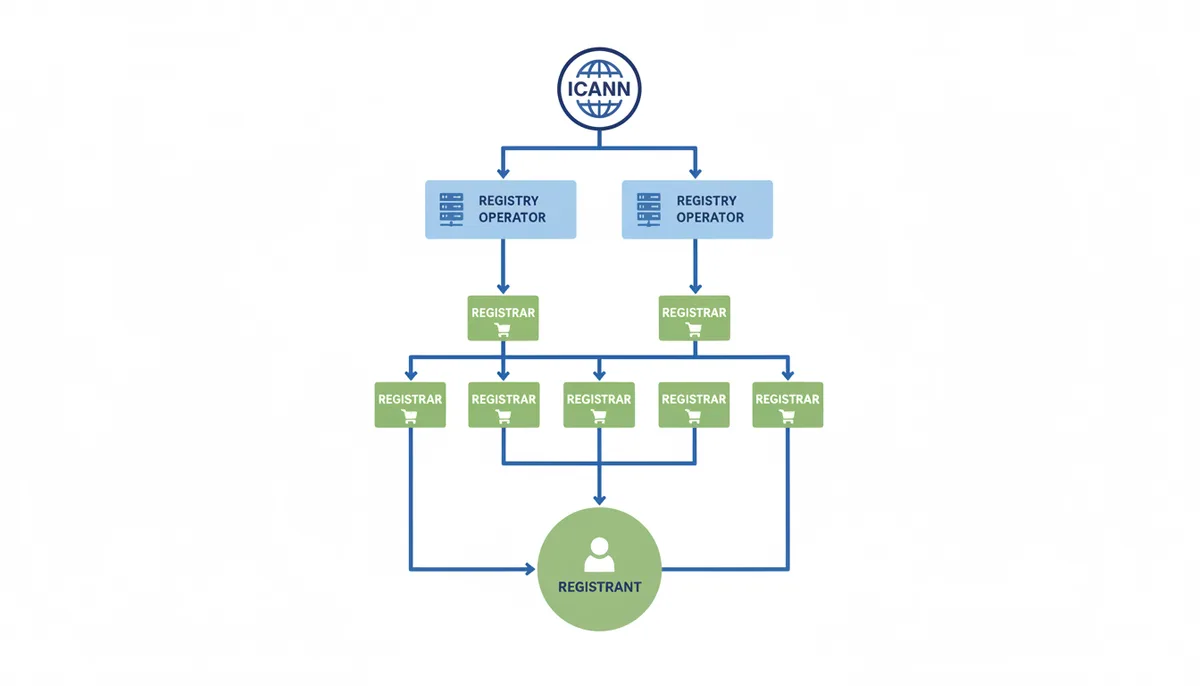
At the bottom of this hierarchy is the Registrant—that's you when you register a domain. You don't own the domain name in the traditional sense; you're leasing the exclusive right to use it for a specified period. Your registrar manages the renewal process and serves as your interface to the registry, but the registry's database is what makes your domain officially yours.
This separation of responsibilities is why a domain checker can query availability so quickly. The tool knows exactly which registry to ask based on the TLD, and registries are optimized to handle millions of these queries daily. The same structure that enables the domain system to scale globally also makes instant availability checks possible.
How Does a Checker Know Which Database to Query?
When you check "startup.ai", the system needs to know that .ai domains are managed by the government of Anguilla, while "startup.tech" goes to a completely different registry operated by Radix in India. This routing happens automatically, but it relies on a critical piece of internet infrastructure most people never hear about.
The magic happens through the IANA Root Zone Database—think of it as the master phone book for domain registries. Maintained by the Internet Assigned Numbers Authority (a function of ICANN), this database contains the authoritative list of all top-level domains and, crucially, which registry operates each one. Every legitimate domain checker either queries this database directly or maintains a local copy that's regularly updated.
Here's how the routing works in practice. Your checker first splits the domain name at the rightmost dot. Everything after that dot is the TLD—whether it's a generic TLD like .com, a country-code TLD like .de, or one of the newer TLDs like .blog. The checker then looks up this TLD in its routing table, which tells it the technical details needed to contact the right registry.
For example, checking "example.com" routes to Verisign's WHOIS server at whois.verisign-grs.com. Checking "example.co.uk" goes to Nominet at whois.nic.uk. The newer .app TLD routes to Google's registry infrastructure. Each registry runs its own WHOIS and RDAP servers, often in multiple locations for redundancy and performance.
This distributed architecture is why there's no single place to check all domain availability at once. You can't query some universal database to see if "mycompany" is available across all TLDs—you must check each TLD separately with its respective registry. Domain checker tools that offer bulk TLD checking are actually firing off dozens or hundreds of individual queries behind the scenes, one for each TLD you've selected.
The system gets more complex with internationalized domain names (IDNs) that use non-ASCII characters. The checker must first convert these to ASCII using Punycode encoding before querying. That's why "münchen.de" gets checked as "xn--mnchen-3ya.de"—the registry databases only store ASCII representations.
The Original Method: What Is a WHOIS Query?
WHOIS has been the backbone of domain lookups since 1982, predating the modern web by nearly a decade. Despite its age, most domain availability checks still rely on this protocol, which operates with surprising simplicity: open a TCP connection to port 43, send a domain name as plain text, receive a text response, close the connection. No authentication, no encryption, no standardized format.
The lack of standardization is WHOIS's biggest weakness. Query whois.verisign-grs.com for a .com domain and you'll get one format. Query whois.nic.uk for a .uk domain and the response looks completely different. Some registries include creation dates in the format "Created: 2010-01-15", others use "Creation Date: 15-Jan-2010", and some spell it out as "Domain first registered: 15th January 2010". This inconsistency forces domain checkers to maintain custom parsers for each registry.
Here's what a typical WHOIS response looks like for an unavailable domain:
Domain Name: EXAMPLE.COM
Registry Domain ID: 2336799_DOMAIN_COM-VRSN
Registrar WHOIS Server: whois.registrar.com
Updated Date: 2023-08-14T07:01:23Z
Creation Date: 1995-08-14T04:00:00Z
Registry Expiry Date: 2024-08-13T04:00:00Z
Registrar: Example Registrar, Inc.
Domain Status: clientTransferProhibited
Domain Status: clientUpdateProhibited
Name Server: NS1.EXAMPLE.COM
Name Server: NS2.EXAMPLE.COM
For an available domain, the response is usually much shorter—often just "No match for AVAILABLEDOMAIN.COM" or "Not found". But again, the exact wording varies by registry, forcing checkers to maintain a database of how each registry phrases its "not found" message.
The privacy problem hit WHOIS hard. Originally, every WHOIS query returned the registrant's full contact information—name, address, phone number, email. Spammers harvested this data relentlessly. When GDPR took effect in 2018, European registries had to start redacting personal information. Now most WHOIS responses show redacted data or proxy service information instead of real contact details.
Rate limiting adds another complication. Registries protect their WHOIS servers from abuse by limiting queries from a single IP address—sometimes to as few as 50 queries per day. Professional domain checkers work around this by distributing queries across multiple IP addresses or negotiating higher limits with registries, but it's why some free checkers ask you to complete a CAPTCHA after a few searches.
The Modern Standard: Why Is RDAP Replacing WHOIS?
RDAP—the Registration Data Access Protocol—represents a complete reimagining of how domain data should be queried and delivered. Standardized by the IETF in 2015, RDAP solves virtually every problem that plagued WHOIS while maintaining backward compatibility during the transition period.
The most visible change is the shift from unstructured text to JSON. Where WHOIS gives you a blob of text that might format dates a dozen different ways, RDAP returns structured data with consistent field names and formats. Every date is ISO 8601. Every status uses standardized EPP codes. A parser written for one RDAP server works for all of them.
Here's the same domain data in RDAP's JSON format:
{
"objectClassName": "domain",
"ldhName": "example.com",
"status": [
"client transfer prohibited",
"client update prohibited"
],
"events": [
{
"eventAction": "registration",
"eventDate": "1995-08-14T04:00:00Z"
},
{
"eventAction": "expiration",
"eventDate": "2024-08-13T04:00:00Z"
}
],
"nameservers": [
{"ldhName": "ns1.example.com"},
{"ldhName": "ns2.example.com"}
]
}
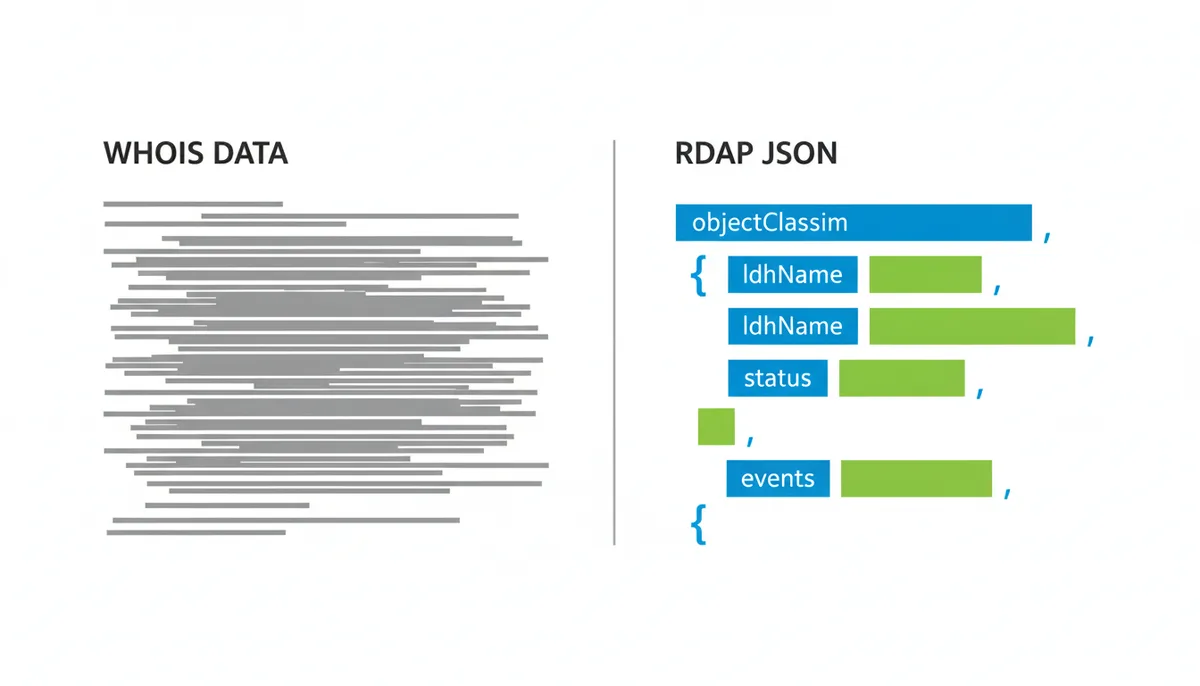
RDAP runs over HTTPS, bringing modern web security to domain lookups. Queries are encrypted in transit. Responses can be authenticated. Rate limiting becomes more sophisticated—instead of blocking an IP after 50 queries, an RDAP server can require authentication for high-volume users while keeping basic queries open to the public.
The protocol handles privacy intelligently. RDAP supports tiered access where different users see different data. A casual checker might see only basic availability information. A trademark attorney with credentials might see additional fields relevant to dispute resolution. Law enforcement with proper authorization might access full registrant details. The same query returns different data based on who's asking.
For domain availability checking, RDAP's standardization is transformative. A checker no longer needs custom parsing logic for each registry. The HTTP 404 response for a non-existent domain is universal. The structured data makes it trivial to extract exactly what you need—domain status, expiration date, nameservers—without complex regular expressions or string manipulation.
The transition from WHOIS to RDAP is happening gradually. Major registries like .com, .org, and .net have been running RDAP servers since 2019. Most European ccTLDs have adopted it. But full deployment across all TLDs will take years. That's why professional domain checkers query RDAP when available and fall back to WHOIS when necessary.
What Do Domain Status Codes Actually Mean?
When a domain checker says "Taken", it's translating technical status codes that reveal much more about the domain's actual state. These Extensible Provisioning Protocol (EPP) status codes, standardized by RFC 5731, tell you not just whether a domain exists in the registry, but what you can and can't do with it.
The most common status you'll see is "ok" (or "active" in some displays). This means the domain is registered, paid up, and functioning normally. No restrictions apply. The registrant can update settings, change nameservers, or transfer to another registrar. But "ok" definitively means the domain is not available for new registration.
Then there are the hold statuses. A domain with "clientHold" has been suspended by the registrar—usually for payment issues, terms of service violations, or during dispute investigations. The domain won't resolve in DNS, so visiting the website returns an error. "ServerHold" is similar but imposed by the registry itself, often for legal reasons. Neither status means the domain is available; it's still registered, just disabled.
The "pending" statuses tell a story of transition. "PendingDelete" means the domain is in its final five days before being purged from the registry. After years of registration, non-renewal, and grace periods, it's about to become available. But you can't register it yet—you must wait for the deletion to complete. "PendingTransfer" indicates an active transfer between registrars, while "pendingUpdate" shows DNS changes in progress.
| Status Code | Plain English Meaning | Can the Owner Renew It? | Is it Available for New Registration? |
|---|---|---|---|
| ok / active | Normal, functioning domain | Yes | No |
| inactive | Registered but no nameservers set | Yes | No |
| clientHold | Suspended by registrar | Must resolve issue first | No |
| serverHold | Suspended by registry | Must resolve issue first | No |
| clientTransferProhibited | Transfer locked by registrar | Yes | No |
| redemptionPeriod | Expired, in 30-day recovery window | Yes, with penalty fee | No |
| pendingDelete | Scheduled for deletion in 5 days | No | No (but soon) |
The "prohibited" statuses are security features. "ClientTransferProhibited" means the registrar has locked the domain to prevent unauthorized transfers—a common protection against domain hijacking. "ClientUpdateProhibited" prevents changes to the domain's settings. These locks are usually voluntary, requested by security-conscious domain owners, and don't affect availability.
Understanding these codes helps you make better decisions. A domain in "redemptionPeriod" might become available in 35 days. A domain with multiple "prohibited" statuses is likely valuable to its owner and actively protected. A domain showing only "ok" with an expiration date next month might be forgotten by its owner—worth monitoring.
What Is the Technical Signal for 'Available'?
Here's what surprises most people: there's no affirmative "available" response in domain lookups. When a domain is available, the registry has no record of it at all. The technical signal for availability is an error—specifically, the absence of any data about that domain name in the registry's database.
In WHOIS, this appears as a terse message that varies by registry. Verisign responds with "No match for domain EXAMPLE.COM". Nominet says "No data found". The .io registry returns "NOT FOUND". A domain checker must know these variations and interpret them all as "available". Any other response—even if it's just status codes and dates—means the domain is registered.
RDAP makes this cleaner with standard HTTP status codes. Query an unregistered domain and you get a 404 Not Found response, just like visiting a non-existent webpage. The response body might include a JSON message for clarity, but the 404 status code is universal. This standardization is one reason why RDAP is superior for automated checking.
Don't confuse this registry-level "not found" with a DNS NXDOMAIN response. DNS and domain registration are separate systems. A registered domain might return NXDOMAIN in DNS if no nameservers are configured or if the nameservers aren't responding. That domain is still taken—it's just not pointing anywhere. Only a "not found" from the authoritative registry indicates true availability.
The distinction matters because some cut-rate domain checkers take shortcuts. They perform DNS lookups instead of proper registry queries because DNS is free and unlimited. If they get NXDOMAIN, they incorrectly report the domain as available. You proceed to registration only to discover someone owns it but hasn't set up hosting yet. Always use checkers that query the authoritative registry.
This absence-as-availability model has an interesting consequence: registries don't maintain lists of available domains because that would be infinite. Every possible string that meets the technical requirements (up to 63 characters, alphanumeric plus hyphens, not starting or ending with a hyphen) is potentially available unless specifically registered. The registry only tracks what exists, not what doesn't.
Why Do Different Checkers Sometimes Give Different Results?
You check a domain on one site: available. You check the same domain on another site five minutes later: taken. This frustrating inconsistency has several causes, and understanding them helps you know which results to trust.
Caching is the primary culprit. Domain checkers cache results to improve performance and reduce load on registry servers. If someone registered the domain after the first checker cached its "available" result, you'll see outdated information until the cache expires. Cache duration varies—some checkers cache for minutes, others for hours. Free checkers often cache longer to stay within registry rate limits.
The solution is to check directly with a registrar when you're serious about a domain. Registrars query the registry in real-time during the actual purchase process. They can't afford to show cached results because they're about to request the registration. If a registrar's purchase page shows the domain as available, that's the most current information possible.
Different query methods create other discrepancies. Some checkers use WHOIS, others use RDAP, and low-quality checkers might use DNS lookups. Each method has different lag times. RDAP typically provides the most current data, while WHOIS servers might lag by minutes during high-volume periods.
Registry propagation delays affect newly registered domains. When you register a domain, the registrar sends the command to the registry, which updates its master database. But registries often run distributed systems with multiple WHOIS and RDAP servers. It can take several minutes for all servers to sync. During this window, different checkers might hit different servers and see different results.
The most concerning discrepancy involves domain front-running—the practice of automatically registering domains that users search for. While ICANN forbids this practice for accredited registrars, some disreputable actors operate domain checkers specifically to identify valuable domains for quick registration. If you check an appealing domain on an unknown checker and find it registered minutes later, you might have been a victim.
To avoid these issues, use established domain checkers with clear privacy policies. Check directly with major registrars when you're ready to buy. For valuable domains, go straight to checkout—don't check repeatedly across multiple sites. And if you see inconsistent results, wait a few minutes and check again directly with a registrar for the authoritative answer.
When Does a 'Taken' Domain Become Available Again?
Domain expiration isn't like canceling Netflix—there's no immediate effect. Instead, expired domains go through a lengthy, standardized process that typically takes 75-80 days before the name becomes available for new registration. Understanding this timeline helps you know when to check back for domains you want.
The process starts on the expiration date, but nothing visible happens. The domain continues working normally. Most registrars provide a grace period—up to 45 days—during which the original owner can renew at the regular price. The registrar sends increasingly urgent renewal reminders. Some registrars park the domain on an advertising page after a week or two, but the original owner still has first rights to renewal.
If the owner doesn't renew during the registrar grace period, the domain enters the Redemption Grace Period (RGP). This 30-day phase is the domain equivalent of a penalty box. The domain stops working entirely—no website, no email. The registry tags it with "redemptionPeriod" status. The original owner can still reclaim it, but now they must pay a redemption fee on top of the regular renewal cost. These fees typically run $75-200, designed to discourage people from using RGP as extra renewal time.
After 30 days in redemption with no recovery, the domain moves to "pendingDelete" status. This final five-day waiting period exists for technical reasons—it gives all registry systems time to synchronize and ensures no last-minute recovery requests are pending. The domain remains completely non-functional and cannot be renewed or restored by anyone.
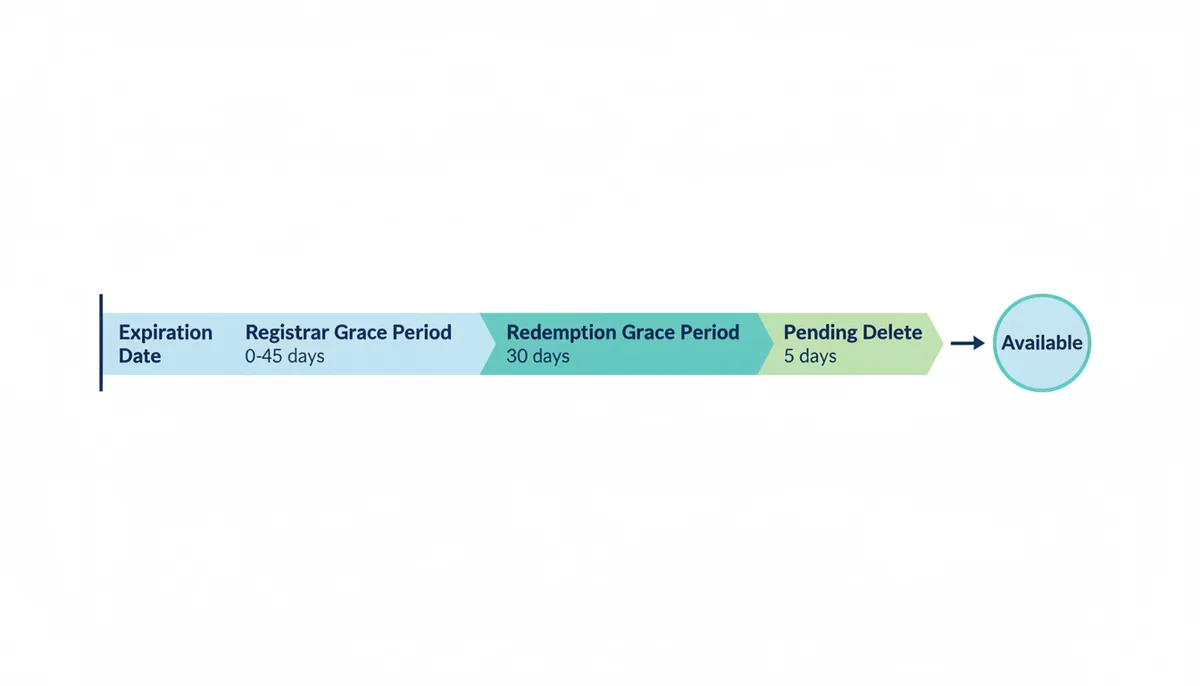
On the sixth day after entering pendingDelete, the registry runs a purge process. The exact time varies by registry—Verisign typically drops .com domains between 11 AM and 2 PM Pacific Time. At that moment, the domain becomes available for new registration on a first-come, first-served basis.
This predictable timeline creates a cottage industry of drop-catching services. These companies monitor domains entering pendingDelete and attempt to register them the millisecond they become available. For valuable domains, dozens of drop-catchers might compete, using multiple registrar connections and precise timing algorithms. If you're manually checking for a desirable expired domain, you're competing against automated systems that can submit thousands of registration attempts per second.
Some variations exist in this timeline. Certain ccTLDs have different grace periods. Some registrars auction expired domains instead of letting them drop. Premium domains might go through special processes. But for most generic TLDs, the 75-80 day timeline from expiration to availability remains consistent.
FAQ
What's the difference between a domain availability check and a DNS lookup?
An availability check queries the central domain registry to see if a name is registered at all. It's asking "Does anyone own example.com?" and connects to the authoritative database for that TLD—like Verisign's registry for .com domains. The answer tells you whether you can register that domain name. A DNS lookup asks the internet's distributed phonebook where to find the website or email server for an already registered and active domain. It's asking "What's the IP address for example.com?" and will only work if the domain is both registered and has nameservers configured. You can have a registered domain that returns no DNS results if the owner hasn't pointed it anywhere yet.
If a domain availability check says a name is 'available,' is it 100% guaranteed I can register it?
It's about 99.9% certain. In very rare cases, two people can try to register the exact same name at the same second, creating a 'race condition' where only one person succeeds. The registry processes registration commands in the order received, down to the millisecond. There's also a tiny window between when you check availability and when you complete payment where someone else could register the domain. For maximum certainty, move quickly from checking to purchasing, and use a registrar's real-time availability check on their actual purchase page rather than third-party checkers.
How long after a domain expires can I register it?
Typically 75-80 days after expiration. The domain goes through a registrar grace period (usually 30-45 days where the original owner can renew normally), then a 30-day Redemption Grace Period where they can still recover it for an extra fee, then a 5-day pendingDelete status before it's finally purged from the registry and becomes available. The exact timeline varies slightly by registrar and TLD, but you're looking at roughly two and a half months from the expiration date printed in WHOIS.
Why is the owner's information hidden in a WHOIS or RDAP lookup?
Due to privacy laws like GDPR, registries and registrars must redact personal data. Since 2018, they can't display a registrant's name, address, email, or phone number without explicit consent or legitimate purpose. Most registrants also use a 'domain privacy' service (often free with registration) which replaces their details with the information of a proxy service. The proxy service forwards legitimate communications while shielding the actual owner from spam, scams, and unwanted contact. You'll typically see the proxy company's address and a forwarding email instead of the real registrant's information.
Can a domain checker tool steal my idea and register the domain for itself?
This practice, called 'domain front-running,' is highly unethical and forbidden by ICANN for accredited registrars. While technically possible, reputable checker tools do not do this as it would destroy their business and credibility. ICANN can revoke accreditation for this behavior, and victims can file complaints. However, some fly-by-night operations have engaged in front-running, so use established, reputable domain checkers, especially those operated by major registrars who have too much to lose from such practices. If you're checking a particularly valuable domain idea, consider going directly to a registrar's purchase page rather than using third-party checkers.
Why can't I register a domain with a status of 'clientHold' or 'serverHold'?
These statuses mean the domain is already registered but is inactive, often due to a payment issue, legal dispute, or terms of service violation. The domain still has an owner—it's just suspended from operating. 'ClientHold' is applied by the registrar, while 'serverHold' comes from the registry itself, usually for more serious issues. The domain is not available for new registration until the hold is removed (if the issue is resolved) or the domain expires and goes through the full deletion cycle. Think of these domains as cars with suspended licenses—they still have owners, they just can't be driven right now.
Conclusion
Domain availability checking touches more technical infrastructure than most people realize. Your simple query traverses the hierarchical world of internet governance, from ICANN's policies down through registry operators' databases. It navigates between legacy WHOIS protocols and modern RDAP standards, interprets EPP status codes that reveal a domain's true state, and must account for caching, propagation delays, and the complex lifecycle of domain expiration.
Sources
- ICANN (Internet Corporation for Assigned Names and Numbers) — The official definitions of Registries, Registrars, and Registrants; policies on WHOIS/RDAP data; and the rules governing the domain expiration lifecycle (RGP).
- IANA (Internet Assigned Numbers Authority) — The authoritative database of all Top-Level Domains (TLDs) and the organization (registry) that manages each one.
- IETF (Internet Engineering Task Force) — The technical specifications for the underlying protocols, including the WHOIS protocol (RFC 3912) and the modern RDAP protocol suite (RFCs 7480-7485, 9082, 9083).
- Verisign — As the registry for .com, their resources provide a real-world example of how a major registry operates and manages domain data and status.