What Domain Availability Really Means Before You Start Naming
You've typed your brilliant business idea into a domain checker, hit enter, and gotten the green light: "Available!" Before you pull out your credit card, stop. That single word hides a minefield of legal risks, technical gotchas, and brand nightmares that most first-time buyers discover only after it's too late.
I watched a friend register what he thought was the perfect domain for his fitness app. The name was technically available, memorable, and matched his brand vision. Three months and $15,000 in development costs later, he received a cease-and-desist letter. Turns out, a supplement company had trademarked that exact phrase two years earlier. The domain was "available" because they'd chosen not to register it—not because he had any right to use it.
This disconnect between technical availability and strategic viability trips up thousands of entrepreneurs every year. Understanding what "available" actually means—and more importantly, what it doesn't—can save you from expensive rebranding, legal battles, or inheriting a domain blacklisted by every major search engine.
What Does "Available" Mean on a Domain Checker? (And What It Doesn't)
When a domain checker returns "available," it's answering exactly one question: Is this specific character string currently registered in the central database for this top-level domain? That's it. The registry for .com domains (managed by Verisign) has checked its master list of roughly 160 million registered names and confirmed yours isn't on it. Nothing more.
Think of it like checking if a specific license plate number is taken. The DMV can tell you if ABC-1234 is registered to another driver, but they won't tell you if using it might infringe on ABC Company's trademark, or if the previous owner used that plate on a car involved in crimes.
Here's what "available" explicitly does not mean:
- No one holds trademark rights to this name or phrase.
- The domain has never been registered before.
- You won't face legal challenges for using it.
- The name carries no negative history or associations.
- Search engines haven't penalized this domain.
- You can actually register it at the standard price.
That last point catches people off guard. Some "available" domains are premium names with price tags in the thousands. Others are technically free but reserved by the registry. Still others might become unavailable in the seconds between your search and attempted purchase—domain drops are competitive, and automated systems often grab expiring names faster than humans can click "register."
The most dangerous misconception is treating domain availability like real estate availability. If a plot of land is for sale, you can generally buy it and build whatever you want (within zoning laws). Domain names work differently. You're not buying property; you're leasing an address. Someone else might own the rights to put their brand name on that address, regardless of who pays the annual registration fee.
How Do Domain Checkers Actually Work? The Path from Search to Registry
Understanding the mechanics of domain checking helps explain why results can vary between tools and why "available" status can change in milliseconds. When you search for a domain, you're initiating a chain of queries that spans multiple organizations and databases.
Your search triggers this sequence: Your browser sends the query to the domain checker's servers. That service, if it's a registrar like the Domain Lookup Tool, queries the authoritative database using either the older WHOIS protocol or the newer RDAP (Registration Data Access Protocol). For .com domains, this means connecting to Verisign's registry. For .org, it's Public Interest Registry. Each TLD has its own authoritative source.
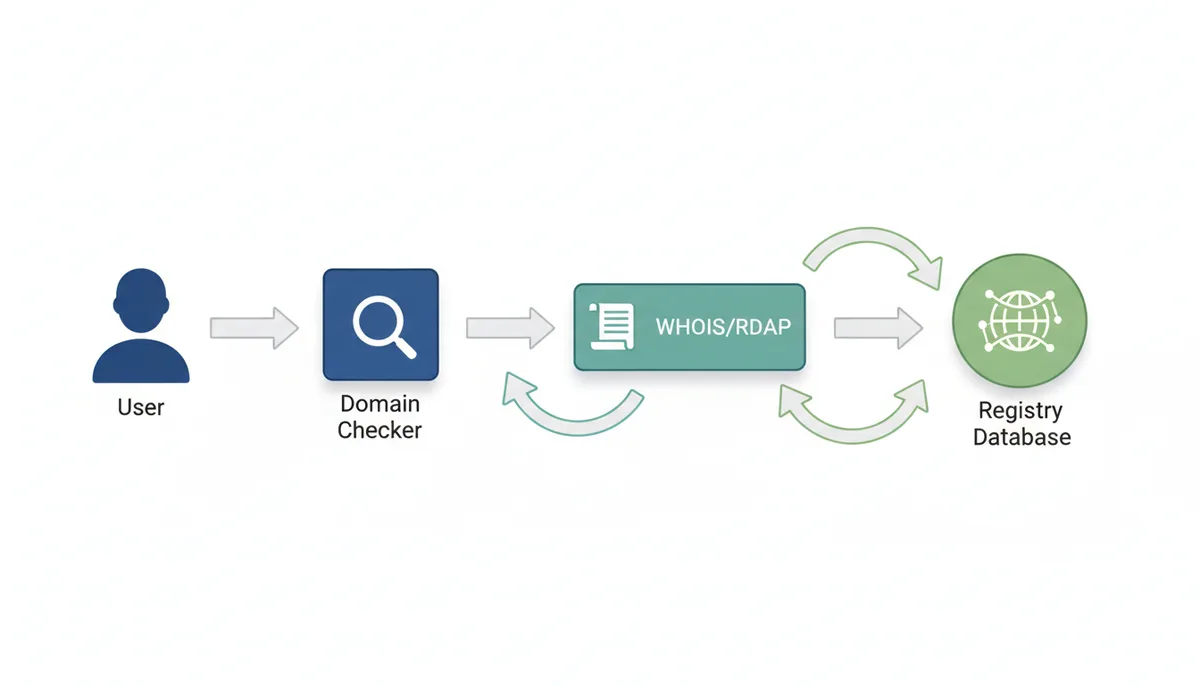
The registry—think of it as the wholesale warehouse—maintains the canonical record of every registered domain under its TLD. Registrars like GoDaddy or Namecheap are the retail stores where you actually buy domains. ICANN (Internet Corporation for Assigned Names and Numbers) oversees this entire system, accrediting registrars and coordinating with registries.
This multi-tier system creates several quirks. Different registrars might cache query results for a few minutes to reduce load on registry servers. If you check the same domain on two sites seconds apart, you might get different answers during high-traffic periods when domains are dropping or during promotional launches of new TLDs.
Premium domain detection adds another layer. Some registrars flag premium names immediately, while others only reveal the higher price after you've started checkout. The registry sets these premium prices for high-value generic terms—think insurance.com or hotels.com—but registrars display this information differently.
DNS propagation can also create false positives. When a domain expires and gets deleted, it takes time for that change to propagate across the internet's DNS servers. A domain might show as "taken" in one location while appearing "available" in another for several hours. Professional domain investors use direct registry connections to avoid this lag when catching dropping domains.
The Lifecycle of a Domain: Why Names Become Available
Domains don't simply exist in binary states of "taken" or "available." They move through a predictable lifecycle that creates windows of opportunity—and confusion—for prospective registrants. Understanding this cycle explains why that perfect domain might suddenly appear available, and whether you can actually get it.
Every registered domain starts with an active registration period, typically one to ten years. When that period ends, the domain doesn't immediately become available to others. Instead, it enters a series of grace periods designed to protect registrants from accidentally losing valuable domains.
First comes the auto-renewal grace period, lasting up to 45 days depending on the registrar. During this time, the domain stops working, but the original owner can renew at the standard price. Miss this window, and the domain enters the redemption period—30 days where recovery is possible but expensive, often costing $100-200 extra as a "redemption fee."
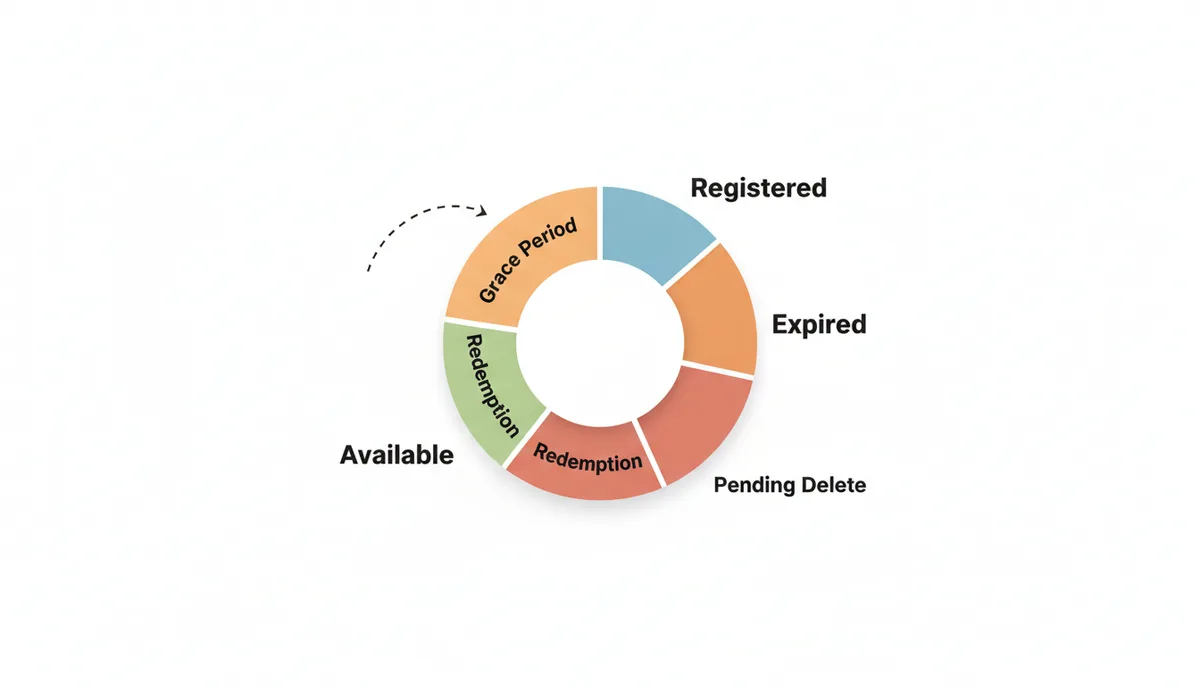
After redemption, the domain enters "pending delete" status for five days. During this phase, nobody can register it—not even the original owner. The domain is in limbo, waiting for final deletion from the registry.
Here's where it gets interesting. Valuable expiring domains rarely make it back to general availability. Domain investors use backordering services to automatically attempt registration the moment a domain drops. Popular domains might have hundreds of backorders placed across different services. If multiple services catch the domain, it goes to auction among their customers.
This means when you see an appealing domain listed as "available," you're often looking at one of three scenarios:
- A brand-new combination that's never been registered.
- An abandoned domain that wasn't valuable enough for investors to backorder.
- A recently dropped domain that's cycling through registrars' inventory systems.
The third scenario explains why a domain might show as available on one registrar but not another. Some registrars warehouse dropped domains briefly, hoping to sell them at premium prices before releasing them to general registration.
The First Check After "Available": Is It Legally Safe to Use?
The biggest threat to your domain isn't technical—it's legal. A domain name and a trademark exist in separate legal systems that overlap in dangerous ways. Registering an available domain that infringes on someone's trademark is like building a house on land you don't own. You might get away with it briefly, but when the real owner shows up, you lose everything.
Trademark law protects brand names, slogans, and logos used in commerce. These protections exist whether or not the trademark owner registered the corresponding domain. Apple could have trademarked "iPhone" without ever registering iphone.com (though they obviously did). If you had grabbed that domain first, you'd still lose it in court.
Your first stop for trademark research should be the USPTO's TESS (Trademark Electronic Search System) database. Search not just for exact matches but for phonetically similar terms and common misspellings. If you're planning "KwikShip" as your domain, search for "QuickShip," "QwikShip," and related variations.
Don't stop at U.S. trademarks. The WIPO Global Brand Database covers international marks. A European company's trademark can still threaten your .com domain through ICANN's Uniform Domain-Name Dispute-Resolution Policy (UDRP). This process favors trademark holders—if they can prove their mark predates your registration and you lack legitimate interest in the name, you'll likely lose the domain.
Common-sense rules help avoid most conflicts:
- Never register misspellings of famous brands (gooogle.com, mircosoft.com).
- Avoid adding generic terms to trademarked names (appleiphones.com, nikeshoestore.com).
- Skip names that sound identical to existing marks, even with different spellings.
- Be extra cautious with made-up words—they're more likely to be trademarked.
Remember that trademark protection is industry-specific. "Delta" is trademarked separately for airlines, faucets, and dental equipment. You might safely use a trademarked term if you're in a completely unrelated industry, but that's a risk requiring legal counsel to assess properly.
Digging for Ghosts: How to Investigate a Domain's Past
An available domain might carry invisible baggage from previous owners. Search engines remember. Spam filters remember. Sometimes angry customers remember. Before committing to a domain, you need to check what ghosts might be haunting it.
Start with the Wayback Machine at Archive.org. Enter the domain and browse through historical snapshots. You're looking for red flags: Was this domain used for spam? Did it host malware? Was it a pharmacy selling questionable pills? Did it impersonate a legitimate business? Any of these histories can poison your SEO efforts for years.
I once evaluated a domain for a client that seemed perfect—short, memorable, exact match for their business name. The Wayback Machine revealed it had hosted an essay-writing service flagged by universities for enabling plagiarism. Five years after the site went dark, educational institutions were still blocking emails from that domain. The client would have inherited a blacklist spanning thousands of schools.
Next, check the domain's backlink profile. Use the free versions of SEO tools like Ahrefs or Moz to see what sites link to your prospective domain. Quality matters more than quantity here. Ten links from spammy directories or gambling sites outweigh hundreds of legitimate links. Google's algorithms remember toxic backlink profiles, and cleaning them up requires months of disavow requests and fresh content creation.
Check blacklists directly. MXToolbox runs your domain against dozens of email and spam blacklists. Being on even one major blacklist means your emails might never reach customers' inboxes. Removing a domain from these lists requires proving new ownership and legitimate use—a process that can take months with no guaranteed success.
Don't forget social media. Search for the domain name on major platforms. A previous owner might have built a following you could inherit—or burned bridges you'll have to rebuild. Twitter handles, especially, often outlive the domains they promoted, carrying positive or negative associations forward.
When "Available" Is a Trap: Premium, Restricted, and Infringing Names
Some available domains are traps that reveal their true nature only after you've emotionally committed to the name. These fall into three dangerous categories, each with its own warning signs.
Premium domains appear available but cost far more than standard registration. Registries identify high-value generic terms and short domains, marking them as premium. You might search for "insurance.info" and see it's available, only to discover at checkout that it costs $5,000 annually, not the usual $15. Some registrars clearly mark premium domains; others hide this detail until you're entering payment information.
Restricted TLDs have eligibility requirements beyond payment. The .edu extension requires accreditation from the U.S. Department of Education. The .bank TLD demands extensive financial industry verification. Country-code TLDs like .ca (Canada) or .de (Germany) might require local presence or citizenship. These restrictions aren't always obvious in search results—a domain might show as "available" when you're actually ineligible to register it.
The most dangerous category is typosquatting and homograph domains. These exploit human error or visual similarity to established brands. Registering "arnazon.com" or "paypaI.com" (with a capital I instead of lowercase L) might seem clever, but it's legally actionable. Courts consistently side with trademark owners in these cases, viewing such registrations as bad-faith attempts to profit from consumer confusion.
| Trap Type | What the Checker Might Show | The Hidden Reality | How to Identify It |
|---|---|---|---|
| Premium Domain | "Available" with green checkmark | Costs $500-$50,000+ annually | Look for "premium" label or check price before cart |
| Restricted TLD | "Available for registration" | Requires specific credentials or location | Research TLD requirements before searching |
| Potential Typosquatting | "Available immediately" | High legal risk, likely domain loss | Compare to Fortune 500 names and common misspellings |
Homograph attacks represent a special subcategory. These use Unicode characters that look identical to Latin letters but are technically different. The Cyrillic "а" looks exactly like the Latin "a" but registers as a completely different domain. While browsers have implemented some protections, these domains still pose risks for email phishing and can trigger immediate legal action from brand owners.
The 'Available and Viable' Checklist: Your Go/No-Go Decision
After all these checks, you need a clear decision framework. This checklist synthesizes everything into a systematic evaluation. Work through each item in order—a "no" on any critical check means abandoning that name and starting fresh.
Technical Availability: Is the domain showing as available on multiple registrars?
Pass: Consistent "available" status across at least three different registrars
Fail: Mixed results or "taken" on any major registrar
Action: If results differ, wait 24 hours and recheck. Mixed results often indicate a domain in transition.
Final Checkout Price: Is the total cost within your budget for initial registration and renewals?
Pass: Standard registration fee ($10-20/year) or premium price you've budgeted for
Fail: Surprise premium pricing or annual costs exceeding your budget
Action: Always proceed to final checkout to verify actual pricing. Premium domains often cost thousands annually.
Trademark Search: Are USPTO TESS and WIPO databases clear of conflicts?
Pass: No exact or phonetically similar marks in your industry
Fail: Any registered trademark that could claim confusion
Action: Search variations and misspellings. When borderline, consult a trademark attorney before proceeding.
Wayback/History Review: Is the domain's past content legitimate and unproblematic?
Pass: Never registered, or only legitimate business use
Fail: Previous use for spam, malware, adult content, or trademark infringement
Action: Check Archive.org for all historical snapshots. Any questionable history means finding another name.
Backlink/Spam Check: Does the domain have a clean or fixable link profile?
Pass: No backlinks, or mostly legitimate sites linking
Fail: More than 20% toxic backlinks from spam or suspicious sources
Action: Use free SEO tools to check. Toxic profiles take months to clean—usually better to skip.
Blacklist/Email Check: Is the domain clean on major email and spam blacklists?
Pass: Not found on any major blacklist
Fail: Listed on Spamhaus, SURBL, or other major lists
Action: Check MXToolbox or similar. Blacklisting can cripple email delivery for months.
Social/Brand Handle Check: Are matching social media handles available or obtainable?
Pass: Key platforms (Twitter, Instagram, Facebook) available or inactive
Fail: Active accounts using your proposed name with established followings
Action: Inconsistent branding across platforms confuses customers. Secure handles before registering domain.
Restricted TLD Eligibility: Do you meet all requirements for this domain extension?
Pass: Using common TLD (.com, .net, .org) or meeting specific TLD requirements
Fail: Choosing restricted TLD without required credentials
Action: Research TLD requirements before searching. Some restrictions only appear during registration.
Budget/Renewal Risk: Can you afford this domain for at least 5 years?
Pass: Total 5-year cost is under 2% of your project budget
Fail: Domain costs would strain your budget or force early abandonment
Action: Premium domains especially need long-term thinking. Losing a domain after building a brand is catastrophic.
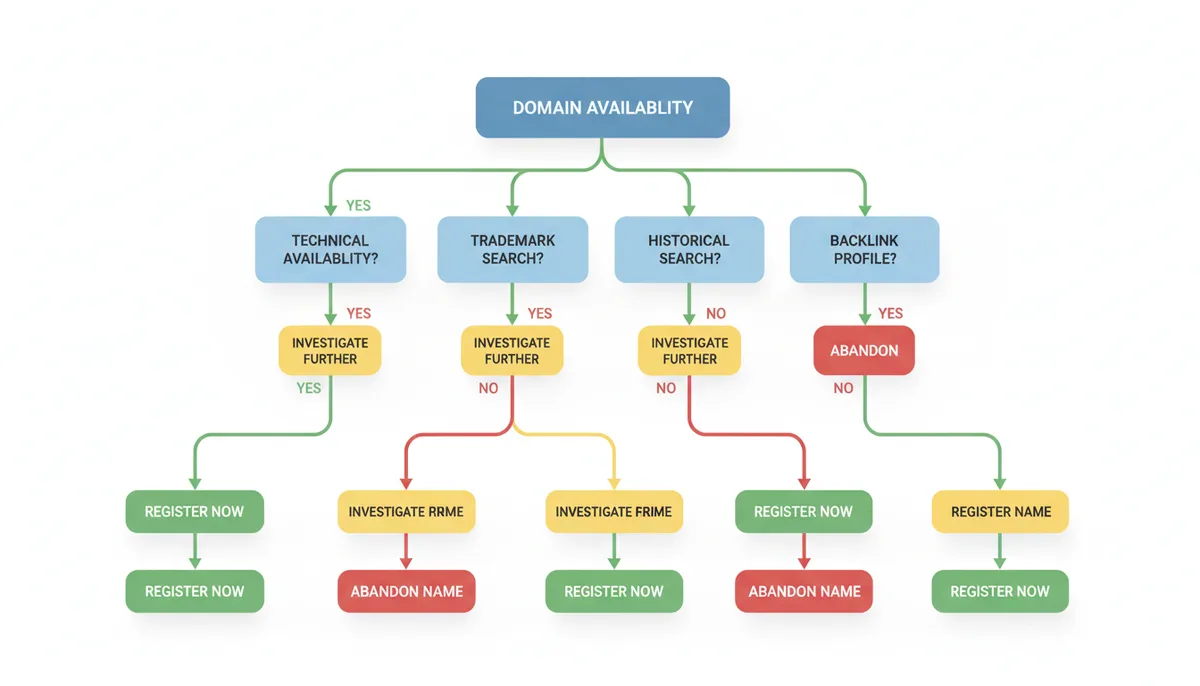
The checklist creates three possible outcomes. "Register Now" means all checks passed—grab the domain immediately before someone else does. "Investigate Further" suggests minor issues worth researching, like unclear trademark boundaries or minimal bad backlinks you could clean up. "Abandon Name" is the hard but necessary decision when legal risks or technical problems make the domain more trouble than it's worth.
Beyond 'Available': How to Acquire a Taken Domain
Sometimes the perfect domain is already registered. Instead of settling for a compromise, you have three paths to acquire it, each with different costs, timelines, and success rates.
Domain backordering places a reservation on a domain before it expires. Services like SnapNames, NameJet, and DropCatch monitor expiring domains and attempt to register them the millisecond they become available. You typically pay $20-100 upfront, which is refunded if the service fails to catch the domain. When multiple people backorder the same domain through one service, it goes to auction among those participants.
Success rates vary wildly. For average domains with one or two backorders, success approaches 90%. For premium names with hundreds of competing orders across multiple services, your chances drop below 5%. The key is choosing the right service—some have technical advantages for specific TLDs or registrars.
Expired domain auctions offer more certainty but higher prices. Once a domain enters redemption, registrars often auction it to the highest bidder rather than let it drop. GoDaddy Auctions and NameJet run most of these auctions. You're bidding against domain investors who know values precisely, so research comparable sales before setting your maximum bid.
Domain brokerage provides the most direct path when you need a specific domain regardless of expiration status. Professional brokers contact current owners discreetly, negotiate prices, and handle secure transfers. They typically charge 10-20% commission on successful deals. Good brokers provide crucial services: hiding your identity (which prevents price inflation), validating ownership, and ensuring safe payment through escrow.
| Acquisition Method | Best For | Typical Cost | Success Likelihood | Process Overview |
|---|---|---|---|---|
| Backorder | Domains expiring soon | $20-100 upfront | 5-90% depending on competition | Place order, wait for expiration, compete in auction if caught |
| Expired Auction | Recently expired names | $50-50,000+ | 100% if you win | Bid directly, payment guarantees domain |
| Brokerage | Specific domains needed now | $500-1M+ plus 15% fee | 60% contact rate, 30% close rate | Broker contacts owner, negotiates, handles transfer |
Set realistic expectations for each method. Backordering works best for domains with predictable expiration dates and moderate competition. Auctions suit buyers willing to pay market prices immediately. Brokerage makes sense for business-critical domains where the cost justifies professional negotiation.
The Real Cost of Domain Conflicts: Case Studies in What Goes Wrong
Theory becomes expensive reality when domain conflicts hit. These hypothetical scenarios, based on common patterns in domain disputes, illustrate how "available" domains can destroy budgets, timelines, and entire businesses.
Scenario 1: The Preventable Rebrand
Imagine a fitness app startup selecting a catchy name and finding the .io domain available. Without conducting a trademark search, they build their entire brand around this name. Months later, after significant investment in development and marketing, they discover an existing fitness company holds trademark rights to that exact name.
The startup faces two choices: fight an expensive legal battle they'll likely lose, or rebrand entirely. Most choose to rebrand, which typically involves replacing all creative assets, rebuilding SEO equity from scratch, notifying existing users, and destroying printed marketing materials. Industry estimates suggest comprehensive rebrands for early-stage startups typically cost between $50,000 and $200,000, not counting lost momentum.
The trademark search would have revealed this conflict immediately. Trademark rights extend across domain extensions—owning the .io doesn't protect you from the .com owner's trademark claims. This scenario repeats frequently because founders confuse domain availability with naming rights.
Scenario 2: The Inherited SEO Disaster
Consider an e-commerce company registering what appears to be a perfect domain—short, memorable, keyword-rich, and showing as available. They build their site, invest in content, but see mysteriously low traffic despite quality SEO efforts.
Investigation might reveal the domain previously hosted problematic content. Common discoveries include former pharmaceutical spam sites, replica goods sellers, or adult content. Search engines remember, and penalties can persist years after the problematic content disappears. The Internet Archive frequently reveals these histories that current availability checks miss.
Recovery requires documenting the bad backlinks, filing disavow requests with search engines, and building enough legitimate authority to overcome the negative history. This process typically takes 12-18 months of consistent effort. Many businesses find it faster to start fresh with a clean domain.
Scenario 3: The Trademark Trap
A startup might think they're clever by registering a domain that closely resembles a major brand—perhaps using creative spelling or special characters. The domain shows as available, and they see an opportunity to capture traffic from users making typos.
This strategy, known as typosquatting, virtually guarantees legal action. Major brands actively monitor for such registrations. Under ICANN's Uniform Domain-Name Dispute-Resolution Policy (UDRP), trademark owners can force transfer of domains registered in bad faith. Courts can award statutory damages up to $100,000 per domain under the Anticybersquatting Consumer Protection Act.
Beyond losing the domain, typosquatters face damaged business reputations and potential bans from registering domains at major registrars. The temporary traffic gain never justifies the legal and reputational costs.
Technical Deep Dive: How Registrars Compete for Dropping Domains
When a valuable domain completes its deletion cycle, multiple registrars compete to claim it first. This competition happens in milliseconds through automated systems that most domain buyers never see but which determine whether you can register that expired domain you've been watching.
The deletion process follows registry-specific schedules. Each registry sets its own timing for when domains in "pending delete" status get released. There's no public announcement of the exact moment—registrars must query continuously to catch domains as they become available.
Registrars connect to registry systems through EPP (Extensible Provisioning Protocol), a standardized interface for domain operations. Each registry sets connection limits to prevent overwhelming their servers. These limits create a technical bottleneck that shapes the entire drop-catching industry.
Some registrars operate multiple ICANN accreditations, effectively multiplying their connection capacity. Others focus on optimizing their existing connections through faster servers and more efficient code. The exact strategies remain closely guarded trade secrets.
The Add Grace Period (AGP) plays a crucial role in this ecosystem. This ICANN-mandated policy allows registrars to delete domains within five days for a full refund. Drop-catching services use this to grab many potentially valuable domains, then keep only those that attract backorders or auction bids. The rest get deleted and cycle through again.
Specialized drop-catching services have invested heavily in infrastructure. They position servers to minimize network latency, optimize their registration commands, and maintain redundant systems to ensure uptime during critical drop windows. The speed differences measure in milliseconds, but those milliseconds determine success.
Your success rate in backordering depends partly on which service you choose. Different services have varying success rates based on their technical infrastructure, number of accreditations, and focus areas. Some excel at specific TLDs or certain types of domains.
One innovation in the field involves aggregating backorders across multiple catching services. Rather than choosing a single service, these platforms place your backorder with several catchers, improving odds but typically resulting in competitive auctions when successful.
Understanding this infrastructure explains why manually trying to register a dropping domain rarely works. Human reaction times can't compete with automated systems operating at millisecond speeds. By the time a person sees a domain as available and clicks "register," automated systems have already attempted registration thousands of times.
The technical competition continues evolving as registries adjust their systems and registrars develop new strategies. This ongoing race ensures that valuable expiring domains rarely return to simple public availability, instead flowing through sophisticated technical systems designed to capture them instantly.
FAQ
If a domain has a bad history, can I clean it up?
Yes, but it's a significant effort. You would need to use Google's Disavow Tool to reject bad backlinks and create a large volume of high-quality content to change its reputation. It is often faster and safer to choose a different name.
What's the difference between a registrar and a registry?
The registry (e.g., Verisign for .com) is the wholesale administrator of the entire TLD. The registrar (e.g., GoDaddy, Namecheap) is the accredited retail company you pay to register and manage your specific domain name.
My desired .com is taken, but the .net is available. Should I register it?
It's generally not recommended. Users often default to .com, which means your traffic and emails could go to the other site. This also creates brand confusion and potential trademark conflicts if the .com is an established business.
The domain I want is listed as 'premium.' Is the price negotiable?
It depends. If it's a 'registry premium' (set by the central registry), the price is usually fixed. If it's an 'aftermarket premium' (owned by an investor), you may be able to negotiate, often through a broker.
What is WHOIS privacy and why do I need it?
WHOIS privacy, or domain privacy, hides your personal contact information (name, address, email) from the public WHOIS database. It is essential for preventing spam, unwanted solicitations, and protecting your personal data from bad actors.
How long after a domain expires can I register it?
It's not immediate. After expiring, a domain typically goes through a 30-45 day grace period and a 30-day redemption period. It may then be auctioned. If it passes through all these stages, it becomes generally available around 75-80 days after expiration.
Making Your Domain Decision
Domain availability is just the first gate, not the finish line. A truly viable domain passes technical, legal, and historical scrutiny while fitting your budget and brand strategy. The hours spent checking trademarks, investigating history, and understanding the registration landscape pale compared to the costs of choosing wrong.
When you find a domain that passes all these tests, move quickly. Good domains disappear fast, especially once you've started searching for them. Domain investors use drop-catching tools that monitor search patterns—your research might alert them to an opportunity.
The Domain Lookup Tool streamlines many of these checks, integrating availability searches with WHOIS data and providing bulk checking capabilities for trademark research. Whether you use automated tools or manual processes, the key is understanding that "available" is where due diligence begins, not where it ends. Your future brand deserves nothing less than a domain that's both technically available and strategically sound.
Sources
- ICANN (Internet Corporation for Assigned Names and Numbers) — The official definitions and relationship between registries and registrars, and the specification of the domain lifecycle statuses (e.g., Redemption Period).
- WIPO (World Intellectual Property Organization) — The definition of cybersquatting and the rules governing the Uniform Domain-Name Dispute-Resolution Policy (UDRP).
- USPTO (United States Patent and Trademark Office) — The process for searching for federally registered trademarks in the United States via the TESS database.
- Verisign — Specific lifecycle details and rules for .com domains, as they are the official registry operator.
- Internet Archive (Wayback Machine) — The claim that it is possible to view historical snapshots of websites associated with a domain name to investigate its past usage.