Why a Domain Can Look Available in One Search and Taken in Another
I Found the Perfect Domain, but Now It's Gone. What Happened?
You spent twenty minutes crafting the perfect domain name. The first checker said it was available. You celebrated, maybe even told a colleague. Then you went to register it, and suddenly it's taken. Or worse—different tools are giving you completely different answers about whether you can have it.
This happens to thousands of people every day, and it's not because someone snatched your domain in those thirty seconds between searches (though that can happen). The real explanation involves three distinct issues with how domain availability gets reported: data delays from caching systems, the complex lifecycle states domains pass through, and special commercial classifications that make "available" mean different things to different tools.
The domain registration system wasn't designed to frustrate you. It's a global database serving billions of queries, maintained by hundreds of organizations, each with their own systems and update schedules. Once you understand the three main reasons for conflicting results, you'll know exactly how to get the truth about any domain's status—and what to do when you encounter these discrepancies.
How Is Domain Availability Supposed to Work? The Path from Registry to Your Screen
Every domain lookup starts with a hierarchy that most users never see. At the top sits ICANN (Internet Corporation for Assigned Names and Numbers), the non-profit that sets the rules for how domains work globally. They don't sell domains or maintain databases—they coordinate the organizations that do.
Below ICANN are the Registries. Each registry manages the authoritative database for specific top-level domains (TLDs). Verisign runs .com and .net. Public Interest Registry handles .org. Nominet manages .uk. When you register example.com, Verisign's database is the single source of truth for whether that domain exists.
Registrars are the companies you actually buy domains from—GoDaddy, Namecheap, Google Domains, and hundreds of others. They're retailers with contracts to sell domains from various registries. When you search for a domain on GoDaddy, they're checking with the relevant registry's database.
This checking happens through WHOIS, a protocol from the 1980s that's slowly being replaced by RDAP (Registration Data Access Protocol). Both systems let anyone query a registry to see if a domain is registered, who owns it (unless privacy protection is enabled), and what its current status is. Your domain lookup tool sends a WHOIS or RDAP query, gets a response from the registry, and shows you the result.
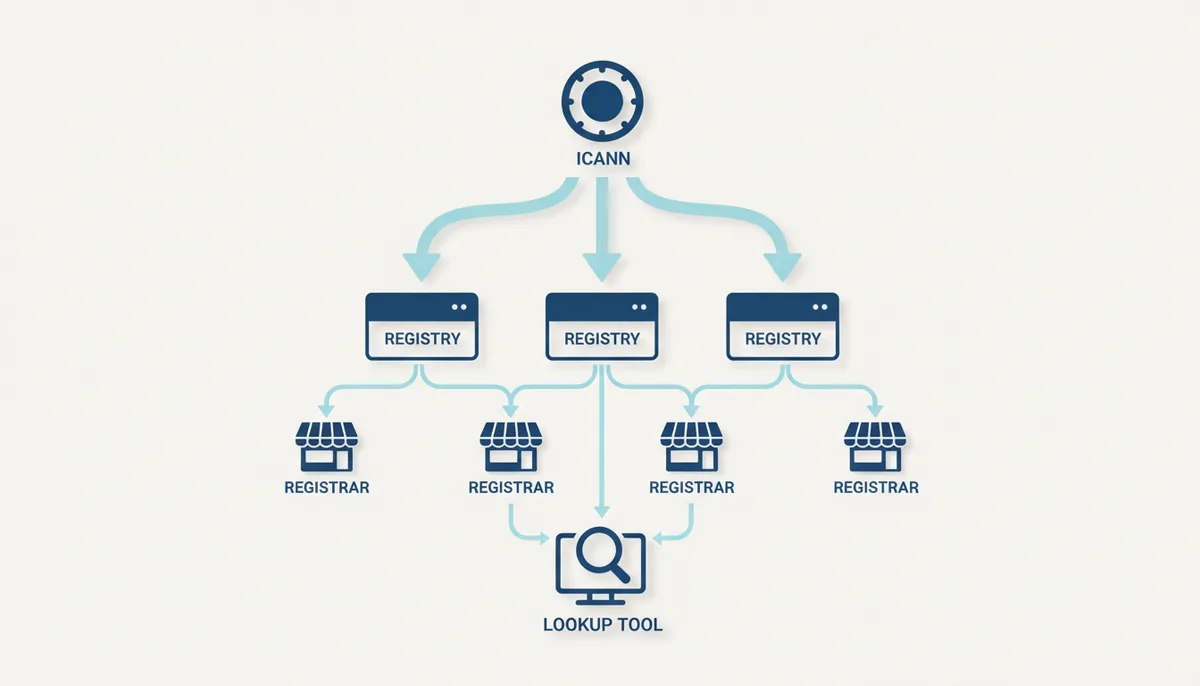
In theory, this creates a simple, reliable system. The registry knows the truth, and everyone queries the registry. In practice, three major complications turn this elegant design into a source of confusion.
The Most Common Culprit: Caching and Data Propagation Delays
Imagine if every Google search had to check with the original website before showing results. The internet would grind to a halt. Domain lookups face the same challenge. With millions of people checking domain availability every hour, registries would collapse under the load if every search hit their servers directly.
The solution is caching—storing temporary copies of lookup results. When you check if startup-genius-app.com is available, the lookup tool might not ask Verisign directly. Instead, it checks its own cache first. If it searched that domain ten minutes ago, it serves you the stored answer.
Caching happens at multiple levels. Your domain checker has a cache. Your registrar maintains a cache. Internet service providers cache DNS queries. Some tools use third-party WHOIS aggregators that maintain their own caches. Each cache has its own Time to Live (TTL)—how long it keeps data before fetching fresh results.
A typical WHOIS cache might have a TTL of 5 to 60 minutes. If someone registered your dream domain 3 minutes ago, but the tool's cache still has yesterday's "available" result, you'll see outdated information. The tool isn't lying or broken—it's showing you what was true when it last checked.
This explains why refreshing the page sometimes gives different results, why different tools disagree, and why a domain can appear available right up until you try to register it. The most accurate results come from tools that explicitly advertise "real-time" checking or that let you force a fresh lookup.
Is the Domain *Really* Available? Understanding Domain Status Codes
Here's where things get genuinely complex. A domain isn't simply "taken" or "available." It exists in one of dozens of possible states, each defined by EPP (Extensible Provisioning Protocol) status codes. Some tools interpret these codes differently, leading to conflicting availability reports.
The status code "ok" means what you'd expect—the domain is registered and active. But consider "redemptionPeriod." The domain's registration has expired, the website is down, and WHOIS might even show an expiration date in the past. Is it available? Not yet. The original owner has 30 days to pay a redemption fee and reclaim it. No one else can register it during this time.
"PendingDelete" sounds final, but it's another waiting period. After redemption expires, the domain enters a 5-day countdown before deletion. It's still not available for public registration. Some basic lookup tools see these domains aren't actively registered and report them as "available," while more sophisticated tools correctly show them as "pending" or "in redemption."
| Status Code | What It Means | Is It Available for New Registration? | What You Can Do |
|---|---|---|---|
| ok | Domain is active and working normally | No | Contact owner to buy |
| clientHold | Registrar suspended domain (often payment issues) | No | Wait or contact owner |
| redemptionPeriod | Expired but owner can still reclaim (30 days) | No | Place a backorder |
| pendingDelete | Will be deleted in 5 days | No (but soon) | Place a backorder |
| serverHold | Registry suspended domain (legal/dispute reasons) | No | Usually permanent |
Other codes indicate temporary holds. "ClientHold" means the registrar has suspended the domain—often for payment problems or policy violations. "ServerHold" indicates the registry itself has intervened, usually for legal reasons. These domains aren't available, but basic availability checkers might not recognize these codes.
The Domain Lifecycle: Why a 'Taken' Domain Can Take Months to Become Available
Every domain follows a predictable lifecycle that explains why expired domains don't immediately become available. Understanding this timeline reveals why you might need to wait months for a domain, and why different tools show different availability during these transitions.
When someone registers a domain, it enters active status. They can use it for websites, email, anything. When the registration period ends (typically after one year), the expiration process begins. The exact timeline depends on both the registry's rules and the registrar's policies.
First comes the Auto-Renew Grace Period. For .com and .net domains, registrars typically provide up to 45 days where the domain stops working but the owner can renew at the normal price. The specific length varies by registrar—some offer 30 days, others the full 45. Many registrars actually auto-renew by default, then give customers this grace period to pay or cancel. Many registrars actually auto-renew by default.
Miss that deadline, and the domain enters Redemption Period. For most gTLDs like .com, .net, and .org, this lasts 30 days. During redemption, the original owner can still reclaim their domain, but they'll pay a redemption fee—typically ranging from $75 to $200 depending on the registrar, on top of the regular renewal. The domain completely stops functioning. WHOIS shows it as expired.
After redemption comes Pending Delete. For most gTLDs, this phase lasts 5 days. The domain waits in limbo. Nobody can register it, not even the original owner. Different registries release domains at different times—.com domains typically drop throughout the day, with many releasing in batches.
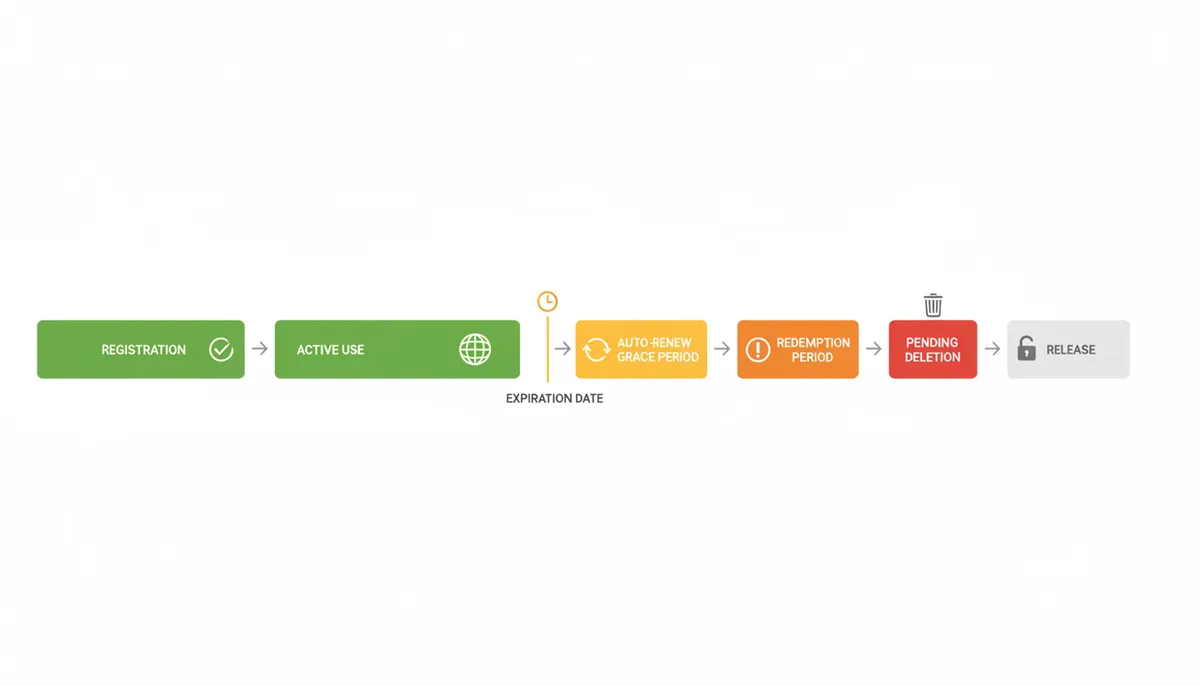
This entire process often takes 75-85 days from initial expiration to public availability, though the exact timeline varies. Some ccTLDs like .uk have different rules entirely—domains might delete immediately upon expiration or have extended redemption periods. During each phase, different lookup tools might report different statuses based on how they interpret the EPP codes and whether they understand the lifecycle stages.
When 'Available' Means 'Available for a Price': Premium and Aftermarket Domains
You search for perfect-business-name.com. One tool says it's available. Another says it's taken. A third offers to sell it to you for $3,500. They're all correct, in their own way.
Premium domains are high-value names that registries hold back from normal registration. Common words, short combinations, and commercially valuable terms often get this designation. Verisign might price best.com at $50,000 instead of the usual $12. The domain is technically unregistered—no one owns it—but it's not available at standard pricing.
Basic domain checkers query whether a domain is registered. Getting a "no" response, they report it as available. They're technically correct but missing the crucial detail about pricing. Registrar searches integrate with premium domain databases and show the actual price, while independent tools might not have this data.
Aftermarket domains create different confusion. Someone owns investment-tips.com but listed it for sale on Sedo or Afternic for $5,000. The domain is definitely registered—WHOIS confirms this. But registrars partnering with these marketplaces might show it as "available" with the sale price, while pure technical lookups correctly show it as taken.
Some registrars blur this further by mixing regular searches with their own inventory of domains they've acquired for resale. You search for a domain, it's taken, but they helpfully offer you their similar domain for $2,500. This isn't a scam—it's a business model—but it explains why different tools give different impressions of availability.
'Thick' vs. 'Thin' WHOIS Models: An Obscure Reason for Discrepancies
Most users never need to know about thick and thin WHOIS models, but this technical distinction creates real availability checking problems. Understanding it explains some of the most puzzling discrepancies between lookup tools.
In a thick WHOIS model (used by .org, .info, .biz), the registry stores everything—domain status, nameservers, registrant contact details, registration dates. One query to the registry gives you complete information. Simple, reliable, consistent.
Thin WHOIS (used by .com, .net, .jobs) works differently. The registry only stores minimal data: the domain name, sponsoring registrar, and status codes. To get full details, you need a second query to the registrar's own WHOIS server. This two-step process introduces multiple failure points.
The registry might respond instantly while the registrar's WHOIS server is overloaded. Or the registry shows the domain as registered, but the registrar's server still shows old data from before the transfer completed. Some lookup tools only query the registry (fast but incomplete), while others do both queries (slower but comprehensive).
ICANN has been pushing all generic TLDs toward the thick model, and the newer RDAP protocol handles this better. But millions of .com domains still operate under the thin model, creating synchronization delays between registry and registrar data that show up as availability discrepancies.
How to Get the Definitive Answer on a Domain's Status
When you absolutely need to know a domain's true status, follow this process. It cuts through caching issues, interprets status codes correctly, and gives you actionable information.
Start with a comprehensive lookup tool that explicitly queries RDAP or WHOIS in real-time. Good tools will show you the raw EPP status codes, not just "available" or "taken." If the tool shows when it last updated its data, even better. Force a fresh lookup if the option exists.
For the most authoritative answer, go directly to the registry. Each major TLD operator provides an official WHOIS lookup. For .com and .net, use Verisign's whois interface. For .org, check Public Interest Registry's lookup. These tools query the authoritative database directly, bypassing all caching layers.
When you find a domain in transition—showing redemptionPeriod or pendingDelete status—don't just wait and hope. Professional domain investors use automated systems that attempt to register these domains within milliseconds of release. Your manual attempts won't compete. Instead, place a backorder through a service like SnapNames, NameJet, or your registrar's backorder system. For $20-60, they'll use high-speed connections to attempt registration the moment the domain drops.
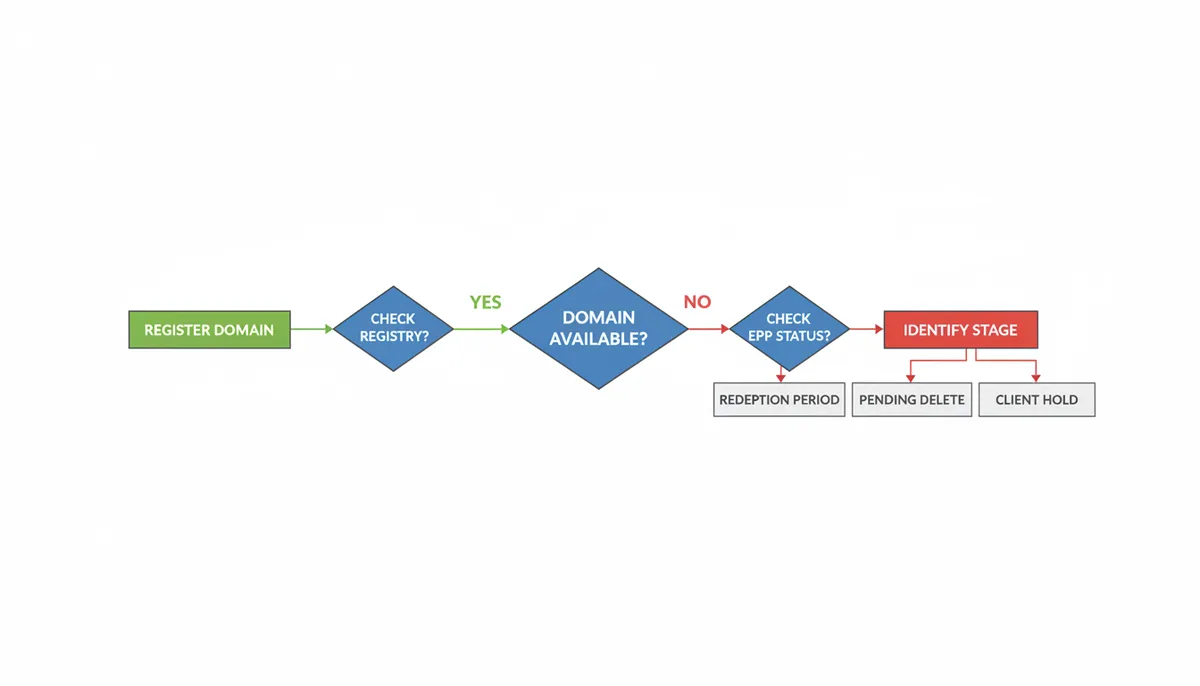
If the domain shows as available but you can't register it, you're likely dealing with either a caching delay or a premium domain. Wait 15 minutes and try again—caches will update. Check the registry's premium domain list or search directly on the registry's registration page, which will show special pricing.
For domains showing as taken but listed for sale, decide whether to negotiate. Use WHOIS to find the owner (if not privacy-protected) or work through the marketplace showing the listing. Remember that listed prices are often negotiable, especially for domains that have been for sale for months.
Real-World Example: Tracking prime-domains.com Through Its Lifecycle
Let's follow a hypothetical domain through every status change to see exactly how availability reports shift over time. Imagine prime-domains.com as a functioning website selling domain-related services. The WHOIS record would show:
Status: ok
Created: 2018-01-15
Expires: 2024-01-15
Registrar: GoDaddy
On January 16, when the owner misses the renewal deadline, the website would immediately stop loading, showing GoDaddy's expiration notice instead. But here's where lookup tools would start disagreeing. GoDaddy's own search might show it as "taken - renew now available." A registrar like Namecheap could show it as "unavailable." A bulk WHOIS checker might report it as "expired - may become available."
The technical reality: the domain would enter status "autoRenewPeriod." GoDaddy would have renewed it on behalf of the owner but given them a grace period to pay. The domain would be absolutely unavailable for public registration, but tools would interpret this interim status differently.
By February 10, if the owner still hadn't paid, the domain would transition to "redemptionPeriod." The website would show nothing—not even GoDaddy's notice. WHOIS tools that understood EPP codes would correctly show the redemption status. But simpler availability checkers might see that the domain wasn't actively registered and report it as "available." Users trying to register it would get error messages about the domain being "restricted" or "not available for registration."
When redemptionPeriod ends, the domain would enter "pendingDelete." For this phase, every lookup tool would agree: the domain is unavailable. But they'd show this differently. Some would say "pending deletion," others "scheduled for release," and basic tools might just show "error - cannot determine status."
When the domain finally drops, a drop-catching service like DropCatch.com could successfully register it within milliseconds for a client who had placed a backorder. Manual registration attempts even seconds later would fail. The domain would already be gone.
But the confusion wouldn't end there. For the next several hours, different tools would show different statuses. Registrars using real-time lookups would correctly show it as taken by the drop-catcher. Tools relying on cached data might still show it as available. If the new owner immediately listed it on a domain marketplace like Sedo, that platform would show it as "available for purchase" at their asking price.
This single domain would generate multiple different availability statuses across its lifecycle, each technically correct at specific moments, but guaranteed to confuse anyone not tracking the complete progression.
The Hidden Layer: How Registrar Competition Creates Availability Conflicts
Beyond technical caching and lifecycle statuses lies a competitive dynamic that directly affects what you see when checking domain availability. Registrars aren't just passive retailers—they're businesses competing for your registration, and this competition shapes how they report availability.
When you add a domain to your cart at one registrar and begin the checkout process, that registrar may place a temporary hold on the domain to prevent other customers from registering it while you complete payment. During this cart hold period—typically 10-20 minutes—the domain might appear as taken when checked elsewhere. This is a legitimate inventory management practice, similar to how e-commerce sites hold products in your cart.
Registrars also maintain private inventories of expired domains they've acquired through drop-catching. When you search for business-consulting.com, Registrar A might show it as taken (because it is), while Registrar B shows it as "available" for $2,500 because they own it and will transfer it to you upon purchase. Neither is lying—they're reporting from different positions in the domain ecosystem.
The aftermarket integration adds another layer. Major registrars partner with domain marketplaces like Sedo and Afternic. When you search for a domain, these registrars check not just whether it's registered, but whether it's listed for sale. A domain that's technically "taken" might show as "available for purchase" with a Buy Now price, while a registrar without marketplace integration simply shows it as unavailable.
The most aggressive competition happens around expiring domains. Registrars partner with drop-catching services, and some run their own. When you check an expired domain's availability, different registrars might show different messages based on their drop-catching partnerships. One might offer to "backorder this domain" while another shows "domain entering deletion phase" and a third simply says "unavailable."
Some registrars also differentiate between domains in their own customer base versus those registered elsewhere. If the domain you're checking is registered through them but expired, they might show more detailed status information or renewal options that other registrars can't access or don't display.
This competitive layer explains why checking the same domain across multiple registrars simultaneously often produces different results, even when all their systems are working perfectly and querying the same registry database.
Building Your Own Availability Monitoring System
For businesses tracking multiple domains or investors monitoring valuable drops, manual checking becomes impossible. Here's how professionals build systems to track true availability across multiple sources.
Start with direct RDAP queries. Unlike WHOIS, RDAP returns structured JSON data that's easier to parse programmatically. Query the authoritative source: for .com domains, that's rdap.verisign.com/com/v1/domain/{domainname}. The response includes all EPP status codes, exact timestamps, and the sponsoring registrar. No interpretation, no caching—just raw data.
Set up monitoring at intelligent intervals. Checking every minute wastes resources and might get you rate-limited. For domains in "ok" status, daily checks suffice. When a domain enters "autoRenewPeriod," increase to hourly. During "redemptionPeriod," you need daily monitoring to catch the transition to "pendingDelete." Once in pending deletion, you know the exact drop time—no monitoring needed.
Track status changes, not just current status. When prime-location.com moves from "ok" to "autoRenewPeriod," that's valuable intelligence even though it's not available yet. You've got 30-45 days to prepare a backorder strategy or contact the owner.
Cross-reference multiple data sources. Query both WHOIS and RDAP—they sometimes update at different speeds. Check the domain's DNS resolution; expired domains often have their DNS removed before the registration technically expires. Monitor the website itself; a suddenly parked page or GoDaddy expiration notice signals an upcoming opportunity.
For domains you're seriously targeting, place backorders at multiple services simultaneously. SnapNames, NameJet, and DropCatch all have different registrar partnerships and success rates. A $60 investment at each service triples your chances. If multiple services catch the domain, you'll only pay for one—they'll auction it between their competing backorder customers.
The most sophisticated operators integrate with aftermarket APIs. When a domain you're monitoring suddenly appears on Sedo or Afternic, you'll know immediately. Sometimes owners list domains for sale days before letting them expire, giving you a chance to negotiate rather than compete in the drop-catching frenzy.
Frequently Asked Questions
If a domain is in 'pendingDelete', can I definitely register it in 5 days?
No, it's not guaranteed. When a domain completes its pendingDelete status, it becomes available to everyone simultaneously. You'll compete against professional drop-catching services that use multiple registrar connections and automated systems to grab domains within milliseconds of release. Manual registration attempts rarely succeed against these systems. Placing a backorder gives you a fighter's chance—the backorder service uses similar high-speed technology on your behalf. Without one, assume you won't get the domain.
Why did the price of a domain suddenly jump from $12 to $2,500?
Two scenarios cause this price shock. First, the registry might classify the domain as "premium" based on its commercial value. Generic terms, dictionary words, and short domains often carry premium pricing that basic lookup tools don't detect. Second, someone might have registered the domain minutes before your second search and immediately listed it for resale. Aftermarket platforms integrate with many registrars, so a domain that was genuinely available at standard pricing can appear for sale at a markup almost instantly.
Can I contact the owner of an expired domain to buy it?
During the grace period and redemption period, only the original registrant can renew the domain. You can find their contact information through WHOIS (unless privacy-protected) and make an offer, but they might prefer to simply renew rather than sell. Many domain investors specifically let domains enter redemption to gauge interest—if someone contacts them, they know it has value and will renew it. Your best opportunity comes when a domain is truly abandoned and enters pendingDelete status.
Does using WHOIS privacy hide the real availability status?
WHOIS privacy services only mask the registrant's personal information—name, address, email, phone number. They replace these with proxy service details. The fundamental domain information remains visible: registration status, creation date, expiration date, and EPP status codes. Privacy protection never affects whether a domain appears available or taken in lookup tools.
Do these rules and timelines apply to all TLDs, like .io or .de?
The basic concepts apply universally—domains get registered, expire, and eventually become available again. But specific timelines vary significantly. Country-code TLDs (ccTLDs) like .de, .io, or .co.uk often have different grace periods, redemption fees, and deletion schedules. Some ccTLDs have no redemption period at all—domains delete immediately upon expiration. Others extend grace periods to 60 or 90 days. Always check the specific policies for your target TLD with its registry.
What's the difference between a domain backorder and just waiting for it to drop?
Waiting for a domain to drop means you're manually checking when it becomes available and trying to register it yourself. This puts you at an enormous disadvantage against automated systems that attempt registration within milliseconds. A backorder service places your order in advance and uses high-speed systems at multiple registrars to grab the domain the instant it's released. You pay only if successful (usually $60-100 total). Without a backorder, your chances of getting any desirable dropping domain approach zero.
Working with Domain Availability Discrepancies
Domain availability checking will never be perfect. The system involves too many organizations, caching layers, and status transitions for instantaneous global consistency. But understanding why these discrepancies occur—caching delays, lifecycle status codes, and commercial classifications—transforms confusion into predictability.
Next time you see conflicting availability reports, you'll know to check the EPP status codes. You'll recognize when a domain is in redemption versus truly available. You'll understand why the registry's own lookup tool gives the most reliable answer. Most importantly, you'll know when to place a backorder instead of waiting and hoping.
The domain that looked available this morning might be in someone else's portfolio tonight. But armed with knowledge of how the system really works, you're far more likely to secure the domains you want—or at least understand exactly why you can't.
Sources
- ICANN (Internet Corporation for Assigned Names and Numbers) — The official definitions of Registries and Registrars, the domain lifecycle (Expired Registration Recovery Policy), and information on WHOIS/RDAP accuracy policies.
- Verisign — Information specific to the .com and .net TLDs, including their domain deletion cycle and the role of the registry.
- IETF (Internet Engineering Task Force) — The technical specifications for the protocols themselves, specifically RFC 3912 for WHOIS and RFCs 7480-7485 for the modern RDAP, backing claims about how these queries technically work.
- IANA (Internet Assigned Numbers Authority) — The authoritative database of all TLDs and their sponsoring organization/registry, which can be cited to show who manages which TLD.
- GoDaddy Help Center — Practical examples of a major registrar's stated timelines for domain expiration, grace periods, and redemption, which can be used as a real-world example of ICANN's policies in action.