GoDaddy Domain Search vs Domain Lookup Tool for Early-Stage Domain Research
A founder types BlueOrbit into a domain checker, sees that the obvious “.com” is taken, and starts cycling through extensions. Ten minutes later, the shortlist contains 23 plausible names. One is short but hard to say aloud. Another contains a keyword that will eventually become a liability. A third is available, but a backlink check suggests it once belonged to a network of thin affiliate pages. None of those problems appear in a simple availability result.
That is where this GoDaddy domain search vs Domain Lookup Tool comparison earns its keep. GoDaddy is designed to move you from an idea to a purchase. Domain Lookup Tool is designed to help you decide whether an idea deserves a purchase. Both can tell you whether a name is available. They differ in what they help you understand before you commit.
My default would be to use both when the domain matters: research first with Domain Lookup Tool, then complete the transaction with the registrar that gives you the best renewal terms, privacy options, and checkout experience. If you need only one, GoDaddy makes sense when the exact name is already settled. A dedicated domain research tool makes more sense when you are still comparing brand names, evaluating SEO potential, or checking a previously used domain.
Why Is a Simple Availability Check No Longer Enough?
Availability answers one narrow question: can this domain be registered right now? A useful domain decision has to answer several harder questions. Can people remember and say it? Does it fit the brand you expect to build around it? Does it create a useful association with your topic, or merely contain a keyword? What did the name represent before?
Those questions have become more important as domain ownership has become more competitive. A clean, available name is no longer proof that it is a good business asset. Two domains can both be unregistered and still be poor choices. One may be difficult to pronounce. Another may carry an awkward search result. A third may have a technically clean backlink profile but no meaningful history. The absence of a registration is not the same as the absence of a reputation.
Understanding what you are buying also requires a little vocabulary. A top-level domain, or TLD, is the final part of a domain: “.com,” “.org,” “.co.uk” and so on. A generic TLD, or gTLD, is operated for general use; a country-code TLD, or ccTLD, represents a country or territory. The domain registry operates the namespace for a TLD. A domain registrar, such as GoDaddy, registers names for customers through that registry.
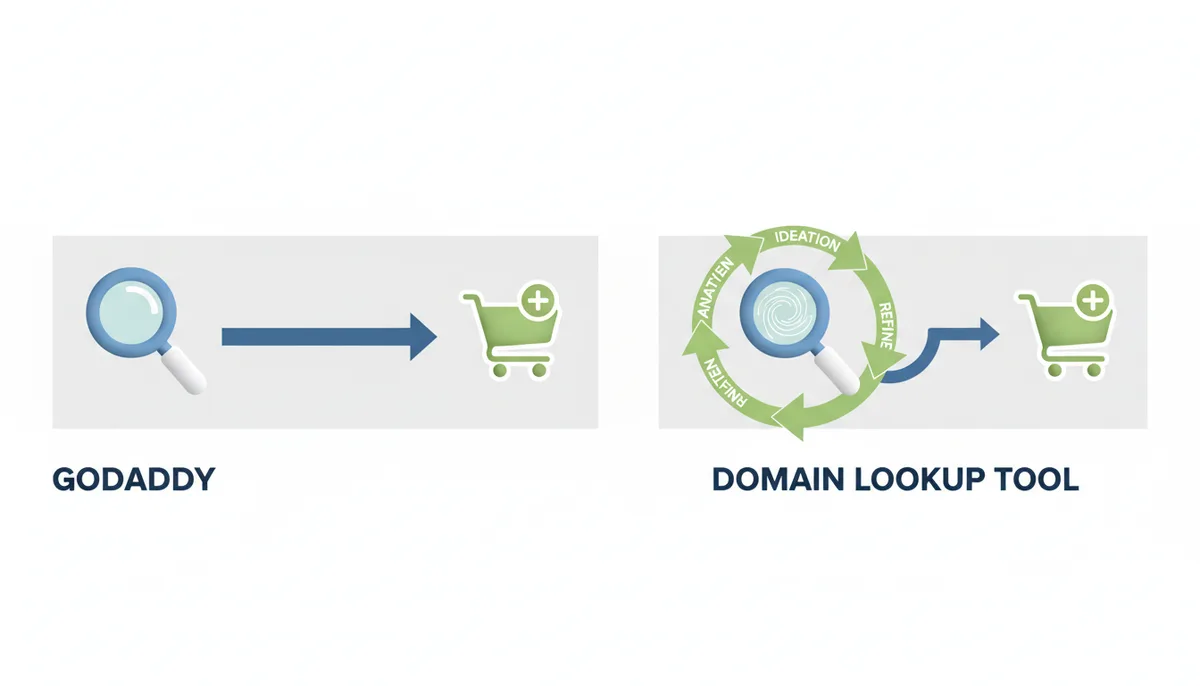
That structure creates two familiar paths. The registrar-led path starts with a name and ends at a shopping cart. The research-led path starts with positioning, generates and tests candidates, and ends with a much narrower buying decision. GoDaddy sits naturally in the first path. Domain Lookup Tool is built for the second.
GoDaddy vs. Domain Lookup Tool: Transaction or Research?
GoDaddy Domain Search is the front door to a larger commercial operation. Its central job is to turn a search into a domain registration, then introduce relevant services such as hosting, email, privacy services, and security products. That objective shapes the interface in sensible ways. Suggestions, related TLDs, premium names, marketplace listings, and checkout options are all close at hand. If you already know what you want, this path is efficient.
The trade-off is that availability tends to dominate the result. A standard domain search is not designed to act as a brand workshop, a backlink investigation, and a legal-screening system at once. You may need to move to separate tools for those tasks. That is not a flaw; it is a boundary around the product’s main purpose.
Domain Lookup Tool takes the opposite approach. It separates research from registration. Its availability checker, WHOIS lookup, name generator, bulk lookup, and SEO analysis are designed to produce evidence for a decision rather than push the decision toward a particular checkout. You can investigate a candidate, compare it with alternatives, and then register it through a registrar of your choice.
That separation creates its own inconvenience: you complete the transaction somewhere else. If you value one continuous path from search to purchase, that extra step is a cost. If you want to examine several candidates before exposing yourself to checkout options, it is a benefit.
This is also why a fair comparison is less about declaring one database “more accurate” than another. Both tools depend on the same underlying registration state. Their value lies in how much context they place around that state and which decision they help you make next.
Feature-by-Feature: How the Tools Stack Up
The table below concentrates on the functions that matter during early-stage research. It does not treat a larger interface as automatically better, because research and purchase are not the same job.
| Feature | GoDaddy Domain Search | Domain Lookup Tool |
|---|---|---|
| Core output | Available names, related alternatives, and a direct path to purchase | Availability results, WHOIS details, SEO insights, and a shortlist of name ideas for research |
| Availability across TLDs | Checks multiple extensions and suggests related domains within the registrar ecosystem | Checks multiple extensions and supports bulk domain checks for research workflows |
| WHOIS and domain history | WHOIS access is available; prior use and historical context are not the central focus of the standard search | Integrated WHOIS and history checks to support research-led screening and due diligence |
| SEO signals | SEO authority and backlink signals are not included in standard domain-search results | SEO reports surface authority, backlink profiles, and spam signals alongside availability |
| Name generation and premium options | Name suggestions plus premium listings, auction options, and marketplace offers within GoDaddy | A dedicated name generator plus consolidated views of premium listings, auctions, and major aftermarkets |
| Bulk research | Bulk search tools are available within the registrar and its marketplace ecosystem | Bulk availability checks and bulk WHOIS lookup to build and maintain a research shortlist |
Availability and speed
Both tools should give you the practical answer you need for most names. The difficult cases are the same in either product: a domain may be in a registry transition, listed in an aftermarket, held in a redemption period, or appear available in one system moments before its status changes elsewhere. For high-stakes candidates, verify the final name at the registrar immediately before payment.
DNS, which translates a domain into the addresses used to reach a website, does not answer the registration question by itself. A domain can have live DNS records and still be available for registration, while a recently dropped domain may resolve temporarily without being registerable. Availability should therefore come from the registrar’s registration data, not from a simple DNS lookup.
Name generation
GoDaddy’s suggestions are useful when you want to stay inside a purchase flow. Domain Lookup Tool’s generator is better suited to a wider discovery exercise because the output can be examined as a set of candidates. In a domain name generator comparison, neither product can tell you whether a name will become memorable. The machine can combine words, extensions, and patterns; only a human can test whether the result sounds credible to a customer.
A good generated-name screen asks different questions from a registrar’s search box: Would the name still work if the product category changed? Does it contain a modifier that will age badly? Can it be said over the phone without spelling it? Is it confusingly close to an existing brand? The research workflow gives those questions room to exist before the shopping cart appears.
Premium and aftermarket names
An available domain is not the only route to a particular name. A registry may classify a name as Premium, charging a higher registration price because of its dictionary value, length, or demand. An aftermarket domain is a previously registered name now offered for resale, often through an auction or marketplace.
GoDaddy provides access to premium names, auctions, and its own aftermarket ecosystem. Domain Lookup Tool’s premium offering is designed to bring major auction and aftermarket results into the same research view. That can be helpful if you want one shortlist across sales channels rather than several disconnected storefronts. It does not make prices uniform: the same name may carry a registration price in one place and a negotiated resale price in another.
Research data and commercial pressure
Standard registrar search results do not normally include SEO authority, backlink quality, or a domain’s prior content history. You can still obtain those signals from separate tools; they simply are not the centerpiece of the purchase page. Domain Lookup Tool combines them with availability and WHOIS research, which reduces the number of tabs and disconnected notes involved.
That research orientation also means fewer purchasing prompts while you evaluate. GoDaddy has every commercial reason to show you a product bundle, a premium alternative, or another extension. Those prompts are not evidence that the tool is poor. They are evidence of what the tool is designed to sell. For someone who has already decided, that is efficient. For someone still deciding, it can add noise.
The User Journey: Two Paths to Finding a Domain
The clearest difference appears when you follow each tool from the first keystroke to the final decision. One path narrows toward “Add to Cart.” The other repeatedly returns you to a wider candidate set.
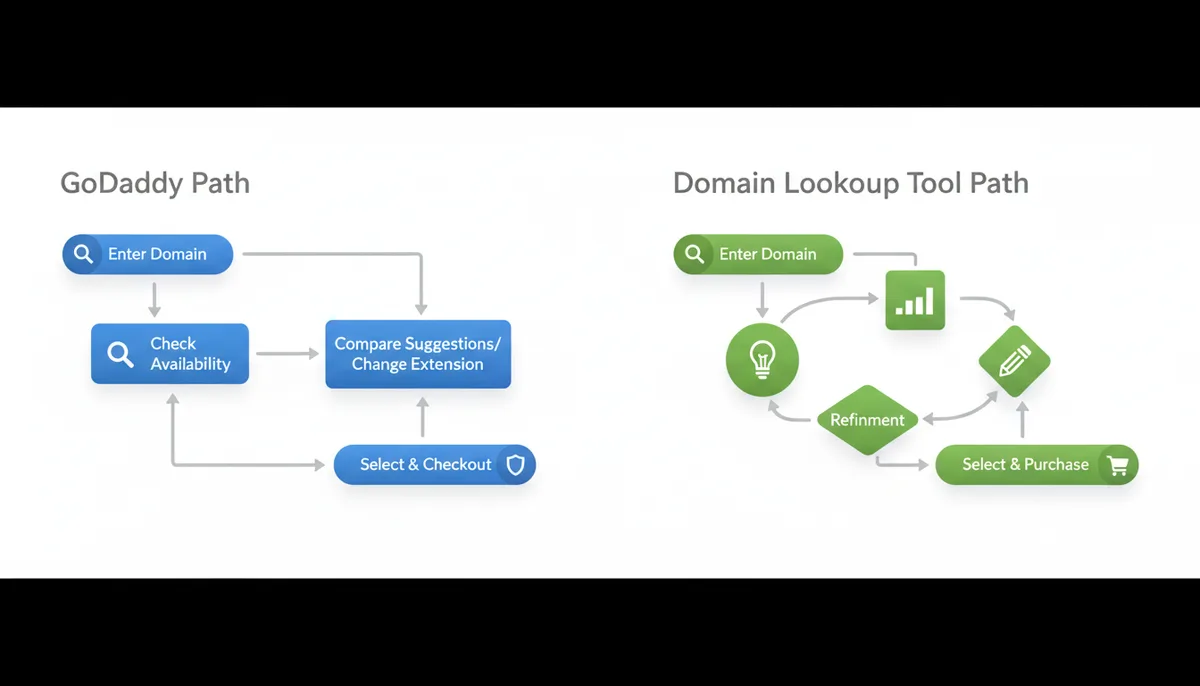
The GoDaddy path
- You enter one exact domain and check availability.
- The result shows whether the name is available and presents related extensions, alternatives or premium options.
- If the first choice is unavailable, you compare the suggested names or change the extension.
- You select a domain and move through checkout, where hosting, email and other services may be offered.
- You register the name.
This path works particularly well when you have already done the strategic thinking elsewhere. You know the exact name, the extension is important, and the main remaining question is what the renewal and checkout arrangement will cost.
Its weakness is the speed at which a provisional favorite can become a purchase. Once a name appears available and the price is visible, it is tempting to treat those two facts as a complete decision. The checkout flow is good at completing that action; it is not designed to challenge the assumptions behind it.
The Domain Lookup Tool path
- You define the theme, audience, keywords and brand qualities you want in a name.
- You use domain generation to create several plausible directions rather than one immediate favorite.
- You check availability across useful TLDs and remove names that conflict with obvious competitors.
- You run WHOIS, history and SEO checks on the remaining candidates.
- You refine the shortlist based on what the data reveals, then repeat the process with the next group of ideas.
- You register the winner through a registrar of your choice.
The cycle matters. SEO data may disqualify a name that looked promising. A history check may reveal that the strongest domain belongs in an aftermarket rather than the regular registration market. Keyword research may send you back to generation with a different wording. That extra iteration is the main reason to accept the extra checkout step.
The research path does not magically prevent every expensive mistake. Someone can still ignore a trademark conflict or buy a misleading name. It does make the mistake less likely because the process asks questions before money changes hands. For startup domain research, that is usually the better trade.
Beyond Availability: Analyzing a Domain’s SEO Potential
An available domain begins with no owned website, but “no current site” does not necessarily mean “no accumulated value.” A domain may have been used by a publisher, a manufacturer, a local business, or a content site. If that history produced relevant links, it may give the next owner a useful starting point.
An expired domain can therefore be more valuable than a newly registered name. Its previous pages may have earned links from publications, directories, or organizations in the same field. Those relationships can make it easier to reach an audience than starting from nothing. The catch is that the links, content, and reputation also come with the domain.
What the SEO report tells you
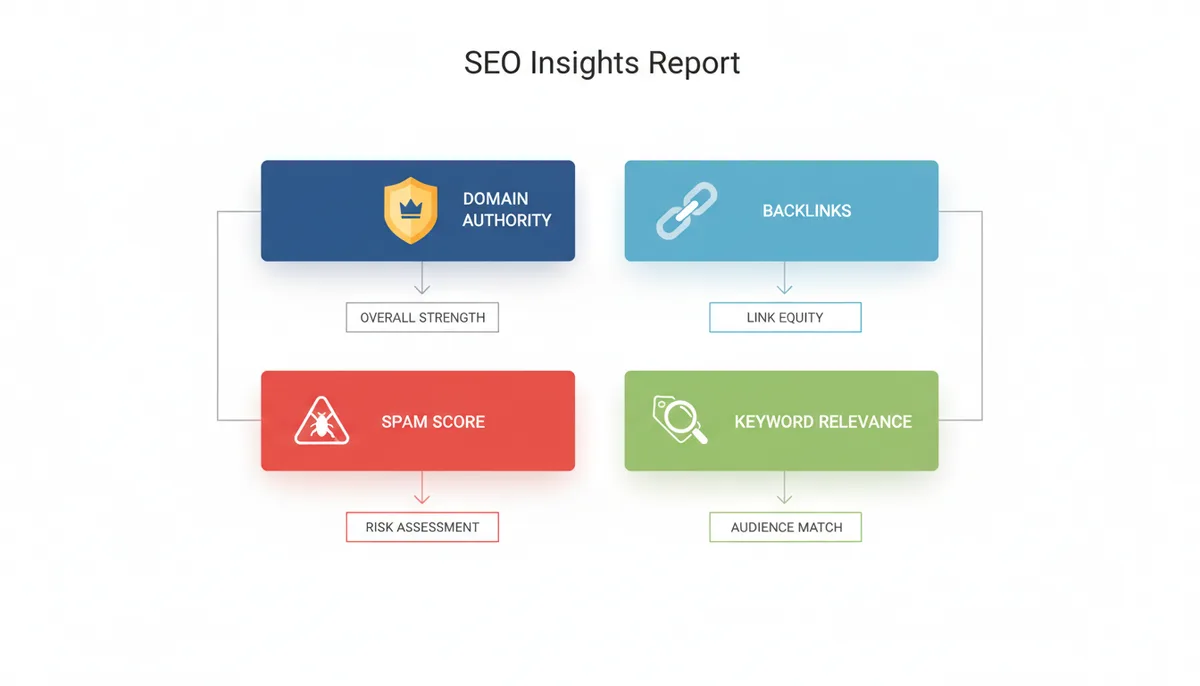
Domain Lookup Tool’s SEO analysis is intended to expose that inherited profile before you buy. Several terms in the report deserve plain-language explanations:
- Domain Authority is a Moz metric, usually represented on a 1–100 scale. It estimates how likely a domain may be to rank based on its broader link profile. It is a comparison signal, not a Google ranking factor and not a prediction of revenue.
- Backlinks are links from other websites to pages on the domain. The count tells you how many links exist, while referring-domain counts reveal how many separate sites supplied them. Twenty links from one site are not the same asset as links from twenty unrelated sites.
- Spam Score is another Moz metric used to flag patterns commonly associated with low-quality or manipulative links. A low score is reassuring but not a guarantee of editorial quality; a high score is a reason to investigate, not a substitute for investigating.
- Keyword relevance describes how closely a domain’s prior subject matter aligns with the terms you want to target. Relevance matters because old authority is most useful when it comes from the same topic and audience.
Read the metrics together. A high authority score attached to irrelevant betting links is not an SEO asset for a company selling accounting software. A modest backlink profile from trusted trade publications may be more useful than a large collection of generic directory links.
A worked comparison
Assume two hypothetical candidates have just cleared availability. The report for BlueOrbitSolar.com shows relevant referring domains, historical pages about commercial solar installation, and no obvious spam pattern. The report for BlueOrbitSolar.net shows a clean but largely empty history with little evidence of external authority.
For a content publisher that intends to build topical authority around commercial solar, the first domain offers a more credible foundation. For a founder who intends to reposition the business under a new visual identity, the second may be preferable. Its history is simpler, its branding is unconstrained, and there are no inherited expectations about the previous site.
This example also shows why “more SEO” is not automatically “better domain.” Authority has value only if it fits the strategy. You accept the cost of an older domain when its history serves your audience, and you accept a weaker SEO profile when a clean brand foundation matters more.
Where the report cannot help
SEO metrics are snapshots, not appraisals. They do not tell you whether a domain is legally safe, whether a trademark holder is preparing a claim, or whether the previous owner can demand a transfer. They also do not guarantee rankings. Search engines evaluate the site you publish, the links you earn, the technical setup, and the user’s experience after every core update.
Use the report to reduce uncertainty and identify candidates worth deeper investigation. Do not use it to predict a traffic figure you have not earned elsewhere. The most valuable output is often a clearer decision about which names deserve another look, not a magical “buy” score.
Uncovering the Past: Is Your “New” Domain Really New?
A dropped domain can carry three distinct legacies: technical residue, content associations, and links. Technical residue includes old redirects, scripts, tracking endpoints, and pages that were never removed from an archive. Content associations include topics the name was used to cover. Links include both useful references and patterns of manipulation.
The risk is not that an expired domain is automatically contaminated. It is that a new owner may assume “available” means “unused.” A domain can be available and still carry years of context that affects trust, crawl behavior, or user perception.
Also be precise about search-engine consequences. A domain does not mechanically inherit every manual action or ranking history attached to the former site, and an expired domain is not automatically penalized. Old spam does not vanish when the content changes, however, and reused domains with deceptive scripts, doorway pages, or manipulative link patterns can resemble the practices that damaged their predecessors. Search engines evaluate the current site, but history can make the job harder.
A practical history check
- Check current registration data. Use WHOIS or RDAP, the structured access method that complements or replaces traditional WHOIS lookups for many domains. Look for creation and expiry dates, status changes, name servers, and any transfer history exposed by the record.
- Inspect archived pages. Search the Internet Archive Wayback Machine for the domain and important paths, not just the homepage. Archived content may be incomplete, and deleted or private pages will not necessarily appear, but it can reveal the name’s former purpose.
- Examine the backlink profile. Identify whether links point to the domain, its pages, or suspicious subdirectories. Determine whether the linking sites are relevant and whether the anchor patterns look editorial rather than automated.
- Check reputation and associations. Search the exact domain and distinctive phrases from the old site. Reviews, complaints, news coverage, and support forums may reveal associations that technical reports omit.
- Run a trademark screen. Use the USPTO Trademark Search for relevant United States marks, then search the relevant commercial market as well. A search result is not legal clearance, and trademark rights are territorial, but it can prevent an avoidable launch-day mistake.
- Repeat the final check at the registrar. Confirm availability, price, renewal terms, and whether the name is being offered as a standard registration, a premium registration, or an aftermarket sale.
Domain Lookup Tool supports this screening with WHOIS and history checks in the same research workflow as availability and SEO data. That convenience is meaningful: a candidate that looks expensive or technically weak can be set aside before you spend more time researching it.
A standard registrar result treats an available name mainly as an item to register. Some registrars and marketplaces expose ownership dates or listing information, but historical usage is not the central organizing principle of the search. That difference does not make the registrar wrong. It means you should add a separate history review when the domain’s past could affect trust, rankings, or legal risk.
When judging domain history and value, resist reducing everything to one number. Comparable aftermarket sales can indicate broad market interest, but they do not establish what a particular domain will sell for. Revenue potential, renewal costs, topical relevance, legal risk, and the buyer’s likely use all affect value. A domain with modest authority and a clean legal position may be worth more to your business than a spectacular but irrelevant backlink profile.
Scaling Your Research: Bulk Lookups and Advanced Filtering
A single founder may test 30 names. An agency working for ten clients may test several thousand. Domain investors need a different workflow from someone entering one name by hand, because the hard part is no longer typing a query. It is keeping the results organized, removing duplicates, and preserving enough context to explain a shortlisting decision.
GoDaddy offers bulk search within its registrar ecosystem. Domain Lookup Tool provides bulk availability checking and bulk WHOIS lookup, which is particularly useful when you need registration and ownership information across a list rather than one candidate at a time.
The honest limitation is that neither product’s public profile establishes a universal row limit, account threshold, or export format. Registrar bulk tools may impose limits based on account or service tier, and domain tools change their plans. Do not build an agency process around an unverified number. Test the current limit with your actual list before committing to it.
Advanced filtering is what turns a raw result set into a shortlist. Useful filters include exact TLD, domain length, hyphens or numbers, registration status, creation date, authority range, referring domains, spam signals, and historical presence. Exports matter when several researchers need to sort, annotate, and share the same evidence. Domain Lookup Tool’s confirmed advantage is its bulk research workflow; if your work requires CSV, spreadsheet, or API export, verify that the current plan includes your required format rather than assuming it from a generic “premium” label.
A disciplined bulk process looks like this:
- Generate names in batches tied to clear criteria.
- Remove obvious duplicates and unavailable candidates.
- Run availability and WHOIS checks on what remains.
- Filter by history, SEO signals and naming constraints.
- Review the shortlist manually for pronunciation, trademark concerns and strategic fit.
- Recheck the finalists immediately before registration.
Do not treat bulk search as permission to submit unlimited requests. Repeated automated lookups can trigger rate limits or abuse controls. Keep requests purposeful, cache the results where appropriate, and recognize that every batch is a snapshot. The last domain on a 500-name list can be taken while you are still working through the first 50.
Pricing and Business Models: Free Search vs. Premium Research
A free search box is not the same as a free decision. The useful comparison is what each product gives you before the purchase and what you eventually pay to complete the work.
| Value proposition | GoDaddy | Domain Lookup Tool |
|---|---|---|
| Core purpose | Turn a search into a domain, hosting, or add-on purchase | Research, compare, and shortlist candidates before registration |
| What is free | Domain availability search and basic domain information | Basic availability checks, WHOIS lookup, name generation, and basic SEO analysis |
| What is paid | The chosen domain and optional hosting, email, security, and other paid services | Premium analysis, higher usage limits, export features, and deeper marketplace research |
| Primary business model | Registrar, hosting, and service sales | Freemium research subscriptions and premium feature tiers |
GoDaddy’s search is free to use because registration and related services generate the revenue. The cost of that model appears in the options presented around checkout and in the price of the domain itself. If you were going to host and use email there anyway, bundling those services may be convenient. If you only need the name, you can choose a registrar whose renewal price and add-on structure better fit you.
Domain Lookup Tool separates the research stage from the transaction. Its free tier supports basic checking and the core research functions described above. Paid tiers are aimed at users who need more volume, deeper analysis, or broader access to premium marketplace information. You pay for research and shortlisting rather than for the domain itself.
The hidden cost of a free registrar workflow is not necessarily the upsell. It is the possibility of making a purchase before doing the checks that would change your mind. A premium research plan is difficult to justify for a personal site with an uncomplicated name. It is easier to justify when one bad decision would affect a company’s primary brand, content strategy, or launch budget.
Which Tool Is Right for You? A Decision Framework
There is no universal “best tool for finding domain names.” The best choice depends on how much uncertainty remains and what kind of mistake would be most expensive.
- Choose GoDaddy Domain Search when you have already chosen an exact, new domain. You know the spelling, the extension is right, and you want a quick path to registration. The advantage is continuity: search, compare options, and purchase in one commercial flow.
- Choose Domain Lookup Tool when you are naming a startup or core brand. You need alternatives, pronunciation tests, competitor awareness, history checks, and SEO context before a name becomes attached to the business. The extra registration step is worth avoiding a rushed choice.
- Use Domain Lookup Tool first when an expired domain is on your list. GoDaddy can show what is available or listed for sale, but the deeper question is whether the previous use and link profile help or harm the new owner. Treat that as a separate due-diligence stage.
- Use bulk research for agencies and domain portfolios. Domain Lookup Tool is better suited to comparing many candidates in one research workflow. Confirm the limits and export requirements for the plan you need, then verify finalists at the registrar.
- Use a registrar alone for a personal project with a clear name. A hobby blog does not need every available metric. A short TLD, a reasonable renewal price, and a memorable word may matter more than Domain Authority.
If I were advising a startup founder, I would spend the first session in the research tool and the second in the registrar. First define the positioning, reject names that sound like competitors, check availability in the relevant TLDs, and examine the finalists’ history and SEO signals. Then compare registration price, renewal cost, privacy, and support at the registrar. If the strongest candidate is available and clean, register it before the research window closes.
If I were advising someone building a topical publication rather than a consumer brand, I would weight relevant history more heavily. A prior site, industry links, and consistent subject matter could save years of visibility work. I would still run the history, backlink, and trademark checks. Authority without due diligence is a liability wearing a useful number as a hat.
Whichever path you take, use the registrar for the final availability check and purchase. Use Domain Lookup Tool when you need the evidence to decide which name deserves that check. Use GoDaddy when the evidence has already been gathered and the remaining task is execution.
Frequently Asked Questions
Can I buy a domain directly from Domain Lookup Tool?
No. Domain Lookup Tool is a research platform, not a domain registrar. Once you have selected a name, you register it through an ICANN-accredited registrar such as GoDaddy or Namecheap. Domains formerly registered through Google Domains are now managed by Squarespace following the transfer of that business. Check the renewal price and account requirements directly with whichever registrar you use.
Is GoDaddy’s domain search free to use?
Yes. You can search for domain availability without paying for the search itself. GoDaddy earns revenue from domain registrations and services such as hosting, email and security products. The domain you choose, its renewal terms, and any add-ons are separate from the free search.
Does checking a domain’s availability risk someone else registering it?
The risk people mean is domain front-running: using a person’s search to register the name before that person can buy it. ICANN treats front-running as prohibited conduct, and reputable registrars and research services are expected to follow rules that prevent it. Domain Lookup Tool does not register the domains you search, which also removes the immediate sales incentive to capture your query.
No tool can prevent an unrelated party from independently registering an available name between your check and your purchase. That is why you should recheck and buy promptly once the decision is made. The solution is not to avoid research; it is to use reputable services and close the gap between checking and registering.
What’s more important: an exact-match keyword domain or a unique brandable name?
For a new brand, I would choose a unique, memorable name unless the exact-match domain is genuinely easier for customers to understand and defend. Keywords in a domain once carried unusual SEO weight, but they no longer act as a shortcut around useful content, links, and reputation.
An exact-match domain can still be useful when clarity matters or when existing brand assets are already centered on the phrase. A brandable name, however, gives you room to describe more than one product, enter another market, or change the positioning later. The practical test is whether people can remember, say, and associate the name with your business after one hearing.
Can I use both tools in my domain search process?
Yes, and that is the approach I recommend for an important domain. Use Domain Lookup Tool to generate candidates, perform availability and WHOIS checks, inspect SEO signals, and narrow the field. Then use GoDaddy or another registrar to confirm the final status, compare renewal terms, and complete the purchase. The tools cover different stages of the decision rather than competing for the same job.
Does Domain Lookup Tool show domain auction and aftermarket results?
Yes. Its premium features integrate results from major domain aftermarkets and auctions, giving you a broader view than a standard registration search alone. That view can include names that are available only through resale rather than first-time registration.
An aftermarket result is still a separate transaction, and the displayed price may not be the final cost. Confirm the seller, marketplace terms, transfer process, and renewal charges before committing. The value of the combined view is comparison: you can see whether a clean registration, a premium registration, or a resale route best matches the name you want.
Sources
- ICANN (Internet Corporation for Assigned Names and Numbers) — The definition of a domain registrar and the rules governing domain registration and the WHOIS/RDAP systems.
- GoDaddy — Claims about the features, user interface, and workflow of the GoDaddy Domain Search tool.
- Moz — The definition and importance of the 'Domain Authority' (DA) metric, which they created and maintain.
- Internet Archive (Wayback Machine) — The claim that it's possible and important to check the historical content and past usage of a domain name.
- United States Patent and Trademark Office (USPTO) — The recommendation that domain name research must include a trademark search to avoid legal issues.