Domain Lookup Tool vs Namecheap Beast Mode for Checking Many Domain Ideas
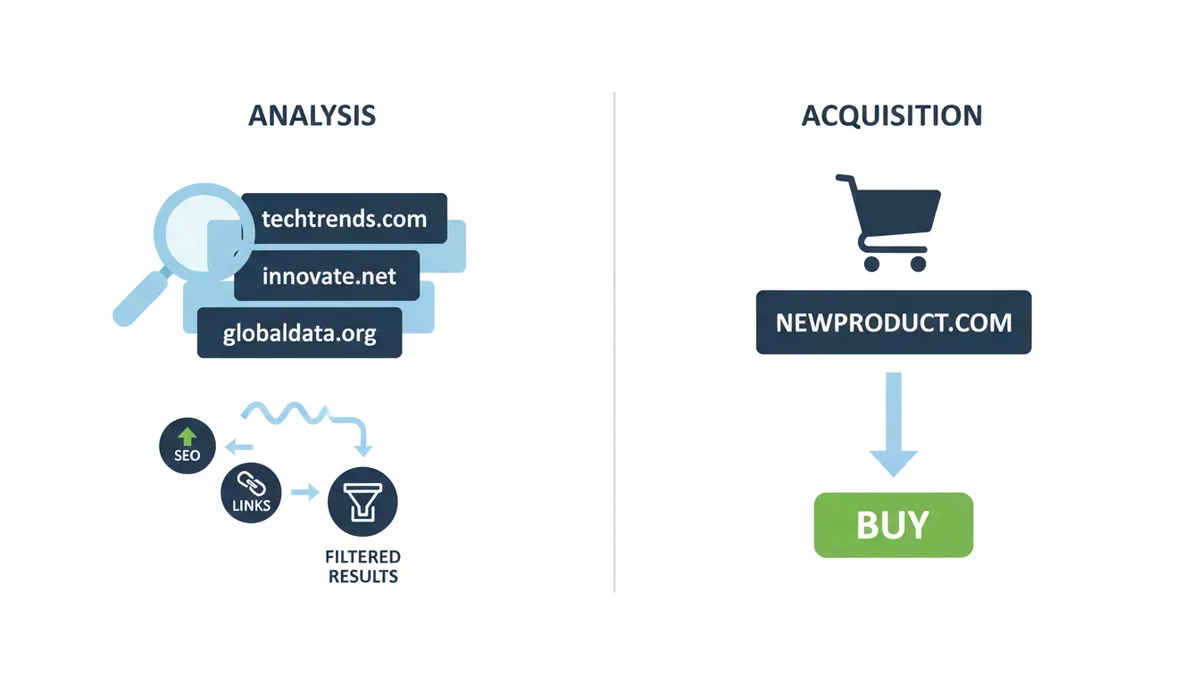
You have a list of 73 potential domain names. Maybe you spent an hour brainstorming them, or a client sent them over in a spreadsheet. You want to know three things: Are any of them available? If they are taken, are they valuable? And can you find 10 good ones without spending the whole afternoon on it?
Most domain tools are built for the "one name, one search" model. They assume you have already made up your mind. You type a name, it tells you if it is free, you buy it. That works for the first five. By the twentieth name you are just looking for an available .com. You lose the thread of which idea was actually the best. You settle for what is available rather than what is right.
This article is for that specific moment. The "shortlist" moment. You have a batch of ideas and you need a tool that handles a batch workflow. We are comparing Domain Lookup Tool and Namecheap's Beast Mode.
The criteria are straightforward. How fast can it check names? What does it tell me beyond "taken" or "available"? Does it help me build a list, or just buy one? And can I keep my place in a long session without making a purchase I do not want yet?
1. What are Domain Lookup Tool and Namecheap's Bulk Search?
Let's get the philosophy out of the way first, because it dictates everything else about how these tools behave.
Domain Lookup Tool is a research and intelligence platform. You cannot buy a domain here. You research them. It connects to multiple data sources to build a profile of every domain you throw at it. It answers the question "Is this a good domain to try to acquire?" by looking at availability, WHOIS history, SEO metrics like Domain Authority and backlinks, and past registration history. It is a data terminal.
Namecheap's Beast Mode is a heavy-duty inventory scanner built inside a retail domain store. It is designed to let you paste a long list of names and instantly see what you can buy and what it will cost you. The interface assumes you already know what you want. It is a purchase facilitator.
Neither tool is better than the other. They play different roles in the lifecycle of choosing a domain name. The mistake most people make is using one for the other's job. If you use a purchase tool for deep research, you end up buying the first available name instead of the best available name. If you use a research tool when you just want to buy a name and be done with it, you create unnecessary friction.
2. How do their bulk checking features compare for speed and scale?
When you paste a list of 100 ideas into each tool, what actually happens? The table below shows the core differences in how they handle bulk input.
| Feature | Domain Lookup Tool | Namecheap Beast Mode |
|---|---|---|
| Max Domains per Batch (Free tier) | ~25 | ~20–50 |
| Max Domains per Batch (Paid tier) | 500+ / API access | No hard cap, rate limits apply |
| Input Methods | CSV import, paste, manual type | Paste, manual type, keyword builder |
| Supported TLDs in Bulk | Broad gTLDs + ccTLDs (consistent data) | Broad retail inventory (what they sell) |
| Export Options | CSV, Excel, API | Cart, checkout |
The export row tells you nearly everything you need to know about the intent of each tool. Domain Lookup Tool is designed to get data out of the platform so you can work with it. Filter it. Sort it. Share it. Decide later. Namecheap is designed to get money into the cart. The results screen shows you a price and a checkbox. The workflow ends with a transaction.
If you need to hand a curated list of available domains to a client or a team member, Domain Lookup Tool saves you a manual transcription step. You export the CSV, you are done. If you just need to buy ten names for your own projects, Namecheap's direct path to the cart is faster.
3. Which tool provides more valuable data beyond "available/taken"?
This is the section that defines the user. If you only care about whether a string is registered, Namecheap gives you exactly that. It tells you if a domain is free, if it is a premium listing (a high retail price set by the current owner), and it serves basic WHOIS information. If a domain is taken, the data stops. The tool is built to clear the path toward a purchase.
Domain Lookup Tool profiles the taken domains too. Why would you care about taken domains? Because taken does not mean unavailable. A domain might be expiring. It might be parked with a holding page that has accumulated backlinks. It might have a forgotten blog with measurable Domain Authority. Finding a taken domain that has residual value is the core skill of domain investing and smart SEO acquisition.
Here is what Domain Lookup Tool shows you after a bulk scan that Namecheap does not:
- Domain Authority and Page Authority. A numerical score that predicts how well a domain could rank on search engines. A score above 20 on an expired domain is a signal worth investigating.
- Backlink profile. The number of referring domains and total backlinks. This tells you if someone else has already built the link equity that you would otherwise have to build from scratch.
- Indexed pages. Whether the domain is still in Google's index. An indexed domain with content is different from a completely fresh registration.
- WHOIS history. How many times has the domain changed hands? Has it been owned by the same person for ten years, or does it change owners every six months?
The practical effect is that Domain Lookup Tool transforms your search from "Is it free?" to "Should I try to get it?" If you scan a list of 500 expired domains and find one with a clean history, 40 referring domains, and a DA of 25, you have found something worth buying a backordering service for. Namecheap would show you the same domain as "taken" and move on. You would never know you passed up an asset.
4. What's the step-by-step process for researching 100 domain ideas on each platform?
Workflow is where the difference between a research tool and a purchase tool becomes concrete. Let us walk through the same task on both platforms.
On Domain Lookup Tool:
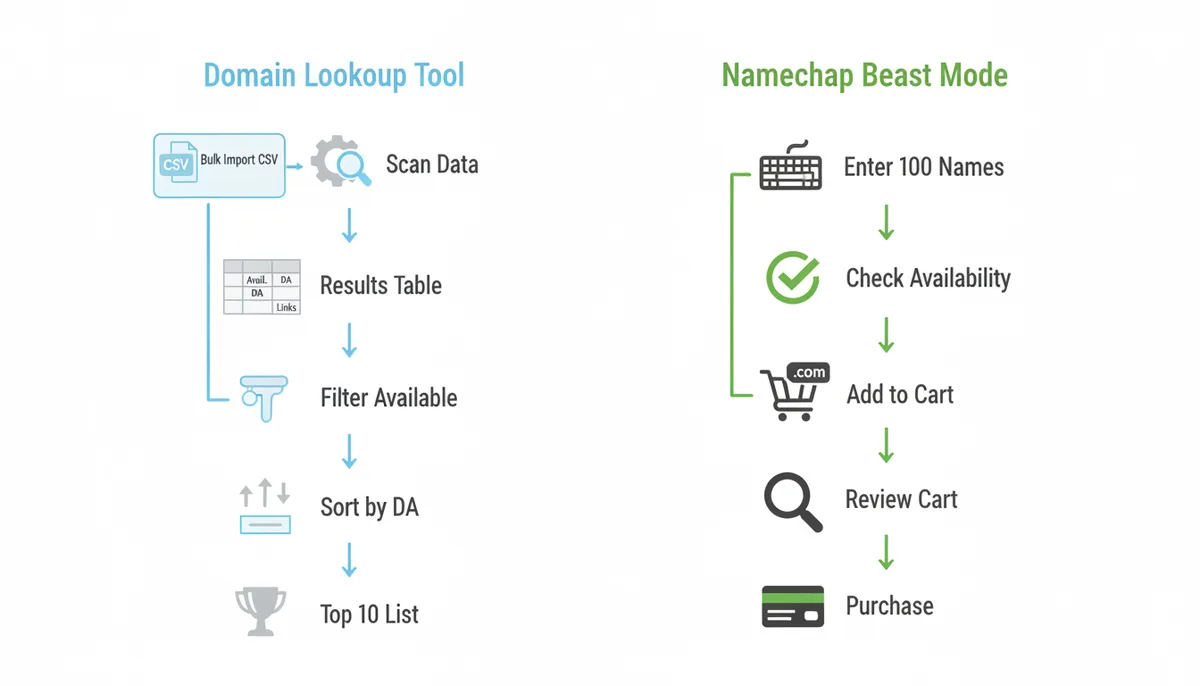
- Open the Domain Checker and select the bulk import option.
- Upload your CSV file containing the 100 names, or paste them directly into the text field. The free tier accepts around 25; a premium account handles the full 100 in one batch.
- Run the bulk check. The scan takes a few minutes because it is pulling WHOIS data, SEO metrics, and availability status from multiple sources.
- The results table loads. Every domain appears as a row. Columns show availability, Domain Authority, backlinks, and registration date. You can sort any column.
- Filter the results. Show only available domains. Then sort by Domain Authority descending. The top result has a DA of 32 and 150 backlinks. It is available. That is your winner.
- Check the boxes of the domains you want to investigate further. Export your shortlist as a CSV file. You now have a curated list of 10 strong domains.
- Open Namecheap (or your preferred registrar). Register the domains you selected. The whole research process took one focused session.
On Namecheap Beast Mode:
- Open Beast Mode from the Namecheap menu.
- Paste the 100 names into the search field. The system parses the list and begins checking availability.
- The scan completes in under 30 seconds. Results show a green checkmark for available, a red cross for taken, and an orange icon for premium domains.
- Scan the green results. Click a checkbox next to each available domain you want. The price is displayed next to each one.
- Click "Add to Cart." Review the cart. Complete the checkout process.
The difference in workflow is stark. Domain Lookup Tool is a divergence-converge funnel. It broadens your options by letting you see data on taken domains, then narrows your list based on objective signals. Namecheap is a straight line. Paste. Check. Buy. The straight line is faster for pure purchasing. The funnel catches opportunities you would otherwise walk past.
5. How do the idea generation features stack up?
What if you do not have a list yet? You are starting from a blank page and you need names to evaluate.
Domain Lookup Tool includes a dedicated Name Generator. You type a keyword related to your business or project. The generator returns names built from synonyms, prefixes, and suffixes. It is designed to produce brandable terms, not just keyword-stuffed phrases. Type "coffee" and it might generate "RoastHaven," "BrewCraft," "CafeNova." It aims for the phonetics of a real brand.
Namecheap's Beast Mode includes a keyword-based suggestion feature inside the bulk search tool. It takes your keyword and combines it with common prefixes, suffixes, and the full list of TLDs that Namecheap sells. Type "coffee" and it returns "bestcoffee.com," "coffeeshop.io," "coffeeclub.net." It is built for checking exact-match availability across multiple extensions.
The honest trade-off: If you need a memorable brand name that does not already exist, Domain Lookup Tool's generator is more creative. If you need to find every available variation of a target keyword, Namecheap's literal approach is faster. Most domain research sessions benefit from starting with the creative generator and moving the resulting list into Namecheap for the final purchase step.
6. What are the common limits and frustrations with each tool?
Neither platform is perfect. Being honest about the friction points helps you choose the right tool for the job.
Namecheap Beast Mode frustrations:
- The interface is aggressive about upselling. Premium domain listings and backordering services pop up during your search. If you are in a pure research frame of mind, this noise can derail your focus.
- Rate limits exist. If you paste a very large list or run searches back to back, you will hit CAPTCHA challenges. The tool is designed for reasonable retail use, not scraping or heavy automated research.
- Taken domains are a dead end. You get a price quote for the premium ones, but you get no intelligence on standard taken domains. No DA, no backlink data, no history. The tool cannot tell you if a taken name is worth pursuing later.
Domain Lookup Tool frustrations:
- The free tier is a teaser. You hit the batch size limit quickly. The most useful data points — SEO metrics, domain history, competitive analysis — live behind the premium subscription.
- The workflow is "research first, buy later." This creates a deliberate separation between finding a domain and registering it. If you prefer to buy on impulse, this extra step feels like friction.
- Data freshness varies. WHOIS records and SEO scores are snapshots from third-party sources. For a mission-critical acquisition, you should verify the data directly at the registrar level before you pay.
Both tools rely on public registries and third-party data providers. WHOIS caching means neither tool is real-time down to the second. A domain that shows as available on a scan might be registered by the time you reach the checkout page. This is a limitation of the ecosystem, not a flaw specific to either tool, but it matters when you are racing for a premium name.
7. Which tool offers better value for your specific needs?
Value is not just the price tag. It is the return on the time you invest and the mistakes you avoid.
| Aspect | Domain Lookup Tool | Namecheap Beast Mode |
|---|---|---|
| Core Tool Cost | Free tier / Premium subscription | Free |
| Primary Goal | Domain intelligence and research | Domain registration and sales |
| Value Proposition | Data depth, time saved on analysis, hidden asset discovery | Speed to purchase, integrated checkout, low registration prices |
| Ideal User Profile | SEO professionals, domain investors, agencies, developers | Entrepreneurs, small business owners, individual buyers |
If you do a domain search once a month, Namecheap Beast Mode covers your needs. It is fast, free, and the final step is a purchase. You do not need data depth because you are only buying one or two names for a single project.
If you do this every week, or if you are evaluating domains as potential assets, the calculus changes. A subscription to Domain Lookup Tool costs money. But if you find one expired domain with 40 referring domains and a solid DA in a month, that single asset can be worth more than a year of the premium plan. The value is in catching the opportunity that a simpler tool would not show you.
The ROI also exists in time spent. Sorting through a CSV export of results is faster than retyping names into a registrar one at a time. For an agency handling multiple client projects, that saved time adds up quickly.
8. When should you choose Domain Lookup Tool over Namecheap (and vice versa)?
The decision comes down to the job you are trying to do, not just the features of the software.
Choose Domain Lookup Tool if:
- You are researching domains to flip or invest in. You need the backlink profile, the history, and the SEO signals.
- You need to evaluate 500 or more expired domains at once. A registrar-based tool will cap out or slow down.
- You are an SEO professional who needs to understand the authority of a domain before you build a campaign on it.
- You want to generate brandable name ideas from scratch and then vet them by real data before you decide.
- You need to export your findings to a client or a spreadsheet. You want data you can share, not a screenshot of a shopping cart.
Choose Namecheap Beast Mode if:
- You have a clear idea of the domain you want, and you are ready to buy it right now.
- You are buying a handful of domains for a simple business launch and you just need to know availability and price.
- You prefer an all-in-one workflow where research and purchase happen in the same session without switching tabs.
- You are hunting for a registration deal on a popular TLD like .io or .co. Namecheap competes on price, and Beast Mode shows you those prices immediately.
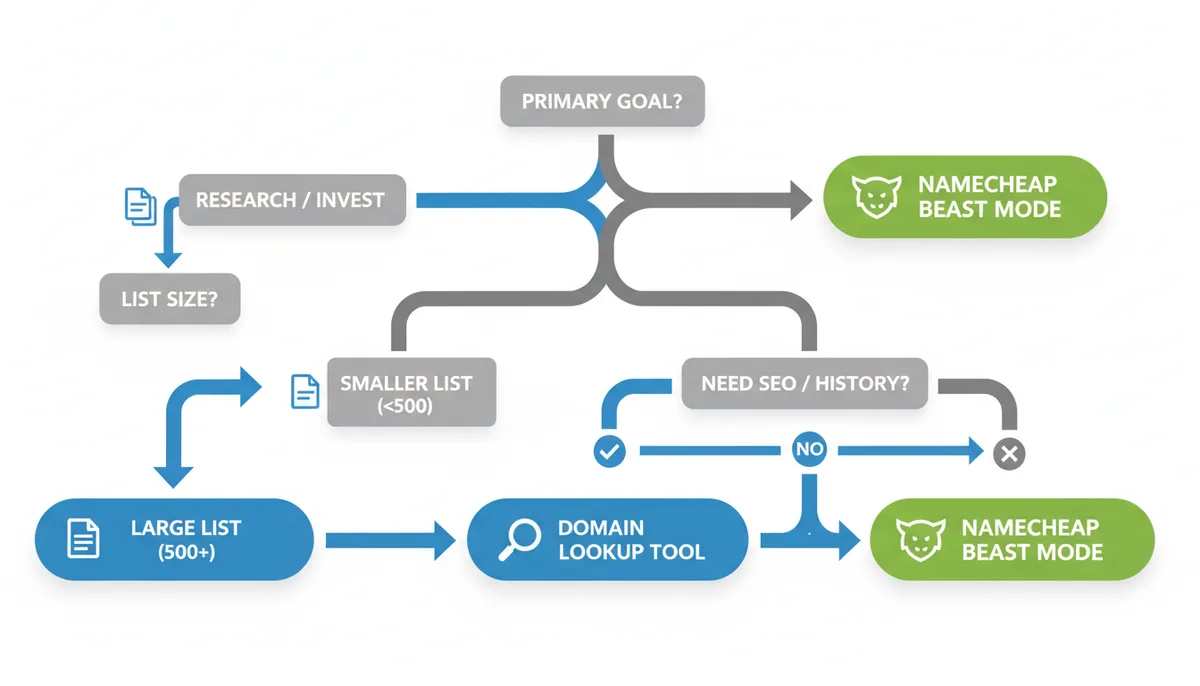
The two tools are not enemies. Most smart domain buyers and SEO professionals use both. Domain Lookup Tool handles the discovery and due diligence phase. Namecheap handles the acquisition phase. The risk is using only one and assuming it does both jobs. If you research with a registrar, you miss data. If you try to buy with a research tool, you add unnecessary steps.
The headline trade-off is this: Domain Lookup Tool is a data platform that happens to have a domain checker. Namecheap Beast Mode is a domain store that happens to have a bulk search tool. Pick the one that matches the phase you are in, and do not ask either tool to be something it is not.
How Bulk Domain Queries Actually Work Behind the Scenes
When you paste a list of 100 domains and click "Check," you are not making one request. You are making hundreds of them, and the infrastructure that handles those requests is the primary reason two tools can return such different results from the same list.
Domain Lookup Tool and Namecheap both start from the same raw material: the global domain registry system. For every domain name, the tool must query the appropriate registry operator. The .com registry is operated by Verisign. .org goes to the Public Interest Registry. Each country code has its own operator, often with its own query interface and session limits. A tool that tries to check 100 domains across 50 different TLDs in one batch is negotiating with dozens of independent servers.
This is where the difference between a purpose-built data engine and a retail checkout tool becomes visible. Domain Lookup Tool posts many queries in parallel, but it respects per-registry rate limits. The .com registry typically allows around 60 queries per minute before it starts returning errors or throttling the connection. A fast bulk scanner that exceeds that limit will receive stale data or partial results. Domain Lookup Tool spreads its queries across time and multiple registry access points so that every result is as fresh as the window allows.
Namecheap's Beast Mode, on the other hand, has a significant advantage for the domains that Namecheap sells directly. Because Namecheap is an accredited registrar with direct connections to several major registries, its internal availability check can sometimes be faster and more accurate for those TLDs than a generic WHOIS lookup run by an unbranded service. For domains that Namecheap does not sell, the tool falls back to standard public WHOIS, which carries the same latency and rate-limit constraints that any other tool faces.
This explains the most common practical frustration: a domain that shows as "available" in a generic checker sometimes shows as "taken" in Namecheap, or vice versa. The generic checker may have queried a cached WHOIS record that is minutes or hours old. Namecheap's registrar connection returns the live registry data for the extensions it supports. Domain Lookup Tool's data pipeline is designed to favour depth and completeness over absolute live-timing. You trade a few seconds of freshness for a richer profile.
The caching layer introduces another nuance. Both tools cache recent results to reduce load on registry servers and speed up repeated queries. If you check the same domain twice in quick succession, you might see the same availability status even if the domain was registered between your two searches. This is a deliberate trade-off. A domain check takes about 0.5 to 2 seconds on a live query. A cache hit returns in under 100 milliseconds. The cache is cleared on a schedule measured in seconds, not milliseconds, and that gap occasionally produces a stale result.
The deeper point is that no bulk checker is truly live. Every tool optimises along a different axis. If you want the absolute freshest status, you must check at the registry terminal, which is a single domain at a time. If you want to check 300 domains in a coffee break, you accept a short staleness window. Domain Lookup Tool chooses richness and consistency. Namecheap chooses speed for the domains it can sell. Understanding this mechanism prevents you from being surprised when a tool reports a domain as available but the registrar's checkout page tells you it was registered hours ago.
A Real Worked Example: Finding a Hidden Asset from an Expired List
Let me walk through a specific session that captures why the extra data from Domain Lookup Tool changes the outcome. The core claim of this article is that checking availability alone causes you to miss valuable domains. An honest example makes the claim testable.
You have a list of 250 recently expired domains from a public drop feed. Your goal is to locate any domain that still has search engine authority and then register or backorder it accordingly.
You import the full 250 into Domain Lookup Tool. The scan takes under two minutes for a list of this size. You are met with a results table showing availability status alongside Domain Authority, estimated backlinks, and a link to the last recorded homepage content.
FAQ
Can I buy domains directly through Domain Lookup Tool?
No. Domain Lookup Tool is a specialized research platform. It helps you find and evaluate the perfect domain, and then you can purchase it from any registrar you choose, like Namecheap or others.
Does checking a domain's availability on these tools increase its price?
No. Reputable tools like Domain Lookup Tool and Namecheap do not engage in what is called "domain front-running." Your search activity is private. It will not cause the platform to register the domain itself and try to sell it to you at a higher price.
Is the WHOIS or SEO data from these tools always 100% accurate?
The data is highly accurate but relies on third-party sources and public records, which can have slight delays. WHOIS is a cached record, not a live query to the registry. SEO metrics like Domain Authority are estimates. For mission-critical decisions, verify availability directly at the registrar and check SEO metrics on the provider's own tool before you commit to a purchase.
Do I need to create an account to use these bulk search tools?
Namecheap's Beast Mode can be used without an account for basic searches. Domain Lookup Tool offers some functionality for free but requires a free account to access advanced features, search history, and the results of your bulk scans. A premium subscription is required to unlock the full data depth and higher batch limits.
Which tool is better for checking country-code TLDs (ccTLDs)?
Both tools support many ccTLDs, but they approach them differently. Domain Lookup Tool typically offers more consistent data across a wider range of ccTLDs because it is a dedicated data platform sourcing from multiple registries. Namecheap is strong on the most popular ccTLDs like .io, .co, .uk, and .de because it sells them. For an obscure ccTLD, Domain Lookup Tool is more likely to return a complete data profile.
Can I use an API to automate my domain searches?
Yes. Domain Lookup Tool offers API access on its premium plans. It is designed for developers and businesses that need to integrate domain data into their own applications. Namecheap also has an API, but it is geared more toward resellers and automating the purchasing process rather than broad data analysis.
Sources
- ICANN (Internet Corporation for Assigned Names and Numbers) — Claims regarding the function of the WHOIS system, its policies, and the roles of registrars and registries in the domain name ecosystem.
- Moz — The definition and explanation of Domain Authority (DA) as a key SEO metric for evaluating a domain's strength, as mentioned in the DLT features.
- IETF (Internet Engineering Task Force) — Technical background on the standards governing the Domain Name System (DNS), such as RFC 1034 and 1035, which underpins how all domain lookups fundamentally work.