What a WHOIS Lookup Can Tell You About a Domain Before You Buy It
Scroll through any domain marketplace and you'll find a listing like this: "Premium aged domain — registered 2011, clean history, never spammed. $3,800 or best offer." Ninety seconds of checking tells a different story. The creation date says the name was registered 14 months ago. The name servers have changed twice in that time. The seller isn't lying exactly — the string of characters may have existed in 2011, but this registration didn't, and the gap between those two facts is where buyers lose money.
That ninety-second check is a WHOIS lookup, and it's the cheapest background check in business. Before you pay anything for a domain — $500 on a marketplace, $15,000 in a private deal, even $12 at retail for a name someone else used to own — the registration record will tell you things the listing never will. This guide walks through what WHOIS lookup tells you, field by field, and how to read that data the way a professional domain buyer does: as evidence about an asset's past, its current legal state, and the problems you might be inheriting.
Why Is a WHOIS Lookup Your First Step in Domain Due Diligence?
You wouldn't buy a used car without checking the title. A domain is stranger property than a car — you can't touch it, inspect it, or test-drive it — yet people routinely pay thousands for one based on a marketplace listing and a gut feeling. The registration record is the title document. It's the closest thing to ground truth that exists about who holds the name, how long they've held it, and whether it's tangled up in anything.
It helps to know why this record exists at all, because the reason shapes what you'll find in it. The WHOIS protocol dates back to 1982, when the internet was a research network and the directory existed so network operators could reach each other when something broke — a misconfigured server, a flood of traffic, a security incident. That purpose never really changed. Today, ICANN (the Internet Corporation for Assigned Names and Numbers, the body that coordinates the domain name system) requires every accredited registrar to collect contact information for each registration and to make a version of it queryable. The point is accountability: if a domain is sending spam, hosting malware, or infringing a trademark, there must be a trail back to someone responsible.
Notice what's not on that list of purposes: helping you buy domains. WHOIS was never designed as a buyer's tool, which is exactly why it works as one. Sellers polish listings. Nobody polishes a registration record — it's a bureaucratic artifact, written for network administrators and lawyers, and that makes it hard to spin. When you check domain registration data before a purchase, you're reading the paperwork instead of the brochure.
In practice, the record gives you clues across three timeframes. About the past: when the name was first registered under its current registration and how often the details have churned. About the present: who stands behind it (or at least who their registrar is), where it's hosted, and what state it's in. About the future: when it expires, whether it can actually be transferred to you, and whether any status codes are about to become your problem. The rest of this article is about squeezing all three for everything they're worth.
My rule: any purchase over a few hundred dollars gets the full workup in this article. Below that, still run the basic lookup — it costs nothing and takes under a minute — but you can skip the historical deep-dive unless something smells off.
Anatomy of a WHOIS Record: Decoding the Key Data Fields
Pull up any record and you'll see a wall of fields in an order that varies by registrar. To interpret a WHOIS record rather than just stare at it, you need to know which three organizations and which four or five fields actually matter.
The three parties behind every domain
Every registration involves a registry, a registrar, and a registrant, and buyers constantly confuse the first two. The registry is the organization that operates the entire top-level domain — Verisign runs .com, for example, and maintains the master database of every .com in existence. The registrar is the retailer that sold the domain to its owner — companies like GoDaddy, Namecheap, or Cloudflare — accredited by ICANN and plugged into the registry's systems. The registrant is the owner: the person or company with legal control of the name. When you buy a domain from another person, the transaction that matters is moving the name from their registrar account to yours, recorded against the registry's database.
The record traditionally lists three contacts: the registrant (the owner, full stop), the administrative contact (Admin-C, historically the person authorized to make decisions), and the technical contact (Tech-C, the person running the servers). On small registrations all three are the same person. Since privacy redaction became widespread, these are often collapsed into a single anonymized entry anyway — more on that in section 6.
The fields that carry the information
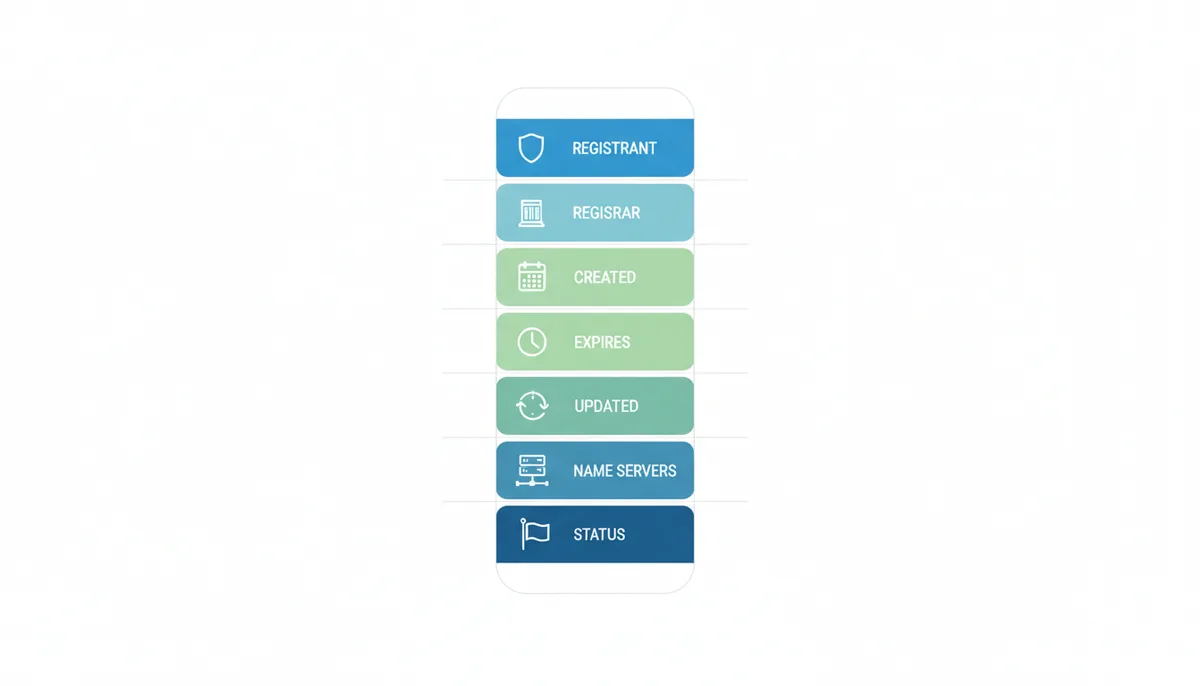
Registrar information. Which company sold the domain, plus their abuse contact. This matters more than buyers expect: it tells you where the domain currently lives, which determines the transfer process, and it gives you a channel to report problems. If a seller claims a domain is "at GoDaddy" but the record shows a registrar in another country, ask why before you send money.
The three dates. The Creation Date is when this registration began — the domain's effective age, with one big caveat I'll cover in section 4. The Expiration Date (sometimes labeled Registry Expiry Date) is when the registration lapses if not renewed; a seller whose domain expires in three weeks is a seller under time pressure, which is either leverage or a warning. The Updated Date is the last time anything on the record changed — a renewal, a name server swap, a contact edit. It does not mean ownership changed, and section 4 explains how to read it properly.
Name servers. These tell you which provider handles the domain's DNS — and therefore hint at what the domain is doing right now. Name servers belonging to a parking or monetization service usually mean the domain is parked and probably for sale. Name servers at Cloudflare, Amazon, or a well-known host suggest an active site. Name servers you don't recognize are worth a quick search, because some are associated with low-quality hosting operations.
Domain Status. One or more codes from the EPP standard describing the registration's current state — whether it's locked, on hold, or mid-expiration. This field is dense enough to get its own section (section 7) with a full reference table. For now: ok means normal, anything starting with server deserves scrutiny.
You'll also see a DNSSEC line (whether the domain's DNS responses are cryptographically signed — usually "unsigned" and rarely a buying concern) and identifiers like the registry domain ID, which you can ignore.
How to Perform a Comprehensive WHOIS Lookup
You have four realistic routes to the same underlying data, and they're not interchangeable. Here's when each one earns its place.
Web-based tools are where you should start and where you'll do 95% of your lookups. Type the name into a checker like Domain Lookup Tool and you get the record with every field parsed and labeled in plain language, which beats reading raw protocol output when you're screening a dozen candidates. Web tools also let you check a whole shortlist quickly — if you're comparing twenty names for a project, bulk checking beats twenty terminal commands.
ICANN's official lookup service is the one to trust when the numbers matter most. Because it's operated by the organization that sits above the registries, it reflects what the authoritative source currently holds rather than what a third party has cached. If a web tool shows an expiration date that contradicts what a seller told you, confirm it here before you accuse anyone of anything.
The registrar's own site. Most registrars offer their own WHOIS domain lookup. It's the same data, but it's the registrar's copy of it — useful as a final confirmation right before a transfer, since the registrar is the party that will actually execute it.
Command line. On macOS or Linux, opening a terminal and typing whois example.com still works and returns the raw record. Windows has no built-in client, so you'd use a web tool or a Linux subsystem there. Raw output has one teaching benefit: for .com and .net you'll often see two sets of results, because those are "thin" registries — Verisign's registry record holds dates, status, and name servers, then refers you to the registrar's record for the contact details. Most other TLDs are "thick," storing everything in one registry record. Parsed web tools quietly merge both views, which is convenient but hides that structure.
Two habits separate careful buyers from everyone else. First, run the same name through two different tools. Third-party services cache records for hours or days; if something changed recently — a transfer, a renewal, a status code appearing — one tool may show you stale data while another shows the current record. A mismatch is information, not an error. Second, screenshot the record with the date visible and save it. If a dispute ever arises over what was represented at the time of sale, that file is your evidence.
| Method | Ease of Use | Data Format | Access to Historical Data | Best For |
|---|---|---|---|---|
| Web-based tool (e.g., Domain Lookup Tool) | Easiest — type the name, read labeled results | Parsed into readable fields | No — current record only | Everyday checks and screening a shortlist |
| ICANN's official lookup | Very easy | Parsed, served via RDAP for gTLDs | No | Verifying what the registry itself has on file |
| Registrar's own WHOIS page | Easy | Parsed, from the registrar's database | No | Final confirmation right before a transfer |
| Command line (whois / RDAP client) | Moderate — requires a terminal | Raw text or raw JSON | No | Scripting, bulk research, unfiltered output |
| Paid historical WHOIS services | Easy | Parsed snapshots over time | Yes — years of archived records | Investigating ownership churn and past use |
One honest limitation to know upfront: none of these methods will reveal an owner who's hidden behind a privacy service. If that's what you were hoping for, section 6 covers what a domain owner lookup can and can't do in 2025.
Using WHOIS to Investigate a Domain's Age and History
Domain age is the single most abused number in aftermarket sales, so let's pin down what it actually is. Any domain age checker is doing trivial date math on one field: today's date minus the Creation Date. A creation date of 14 March 2009 makes the registration about sixteen years old as I write this. Simple. The complication is what that number does and doesn't mean.
Start with the honest caveat on SEO. Google has said for years that raw registration age is not a ranking factor — the difference between a six-month-old domain and a one-year-old domain is negligible on its own. What carries weight is continuous history: an old registration that has hosted a real site the whole time, accumulating links and trust, versus an old string of characters that has been dropped and re-registered four times. Age matters to buyers mostly as a proxy for that history and as a basic trust signal, not as a ranking cheat code.
Now the caveat that costs people money: age resets when a domain fully expires and drops. If a domain registered in 2009 is allowed to lapse, passes through the deletion cycle, and someone re-registers it in 2023, the creation date reads 2023. Full stop. The registry treats it as a brand-new registration. So when a seller advertises a name as "est. 2009," the creation date tells you whether the registration is that old or merely the idea of the name. One timing nuance worth knowing: domains bought through expiry auctions before the deletion cycle completes keep their original creation date, because the registration transfers rather than dies. Domains caught after they fully drop start over at zero.
For anything beyond the current snapshot, you need a WHOIS history check. Several paid services archive registration records going back years, letting you page through past versions of a record the way you'd page through old filings. This is where a domain's biography emerges. What you're looking for:
- Ownership churn. One owner for a decade is a clean biography. Four registrant changes in three years means the name kept being passed around — and you should wonder why each holder let it go.
- Name server rotation. A domain that hopped between six different hosting providers in two years has the classic footprint of a site built to be disposable. This pattern is common with PBNs (Private Blog Networks — clusters of sites built purely to sell or funnel links), which Google actively devalues.
- Privacy toggling. Record visible, then hidden, then visible under different details can indicate ownership changes the parties preferred not to advertise.
Worked example, because this is where it clicks. A seller asks $2,500 for a gardening domain, describing it as "registered 2009, used for a blog, retired in 2018." The current record shows a 2021 creation date — so the original registration died and was caught again; the "2009" is marketing. A history pull shows three owners since 2021 and name servers rotating between cheap hosting outfits every few months. Whatever that domain did between 2021 and now, it wasn't a retired gardening blog, and there's a real chance it's carrying a spammy link profile or worse. You either walk away or reprice it as a raw name with no history premium — maybe a tenth of the ask. The WHOIS data didn't just inform the decision; it set the price.
And the Updated Date, which confuses everyone: it moves on any record change — renewal, name server edit, toggling privacy, a typo fix in the contact email. A recent Updated Date with a stable creation date and unchanged name servers usually just means the owner renewed. The FAQ has more on this, because sellers love to wave a recent Updated Date as proof of "recent activity."
Warning Signs: How to Spot Red Flags in a WHOIS Record
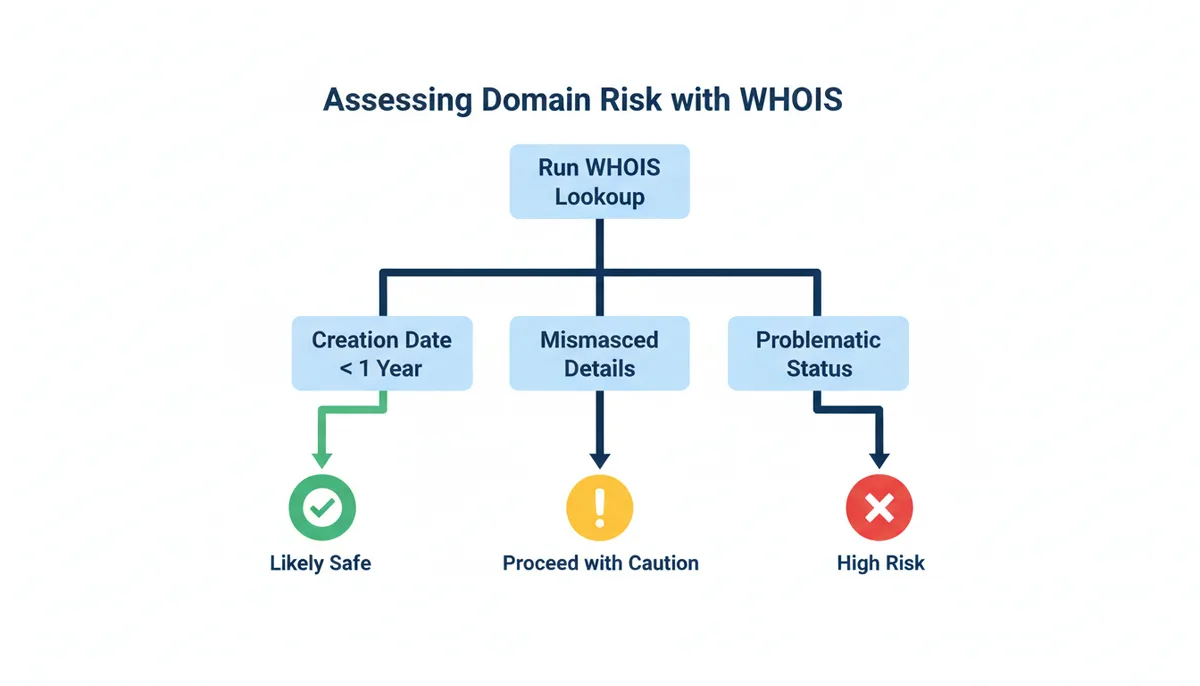
Most bad domain deals announce themselves in the record before money changes hands — buyers just don't know which lines to read. Here are the WHOIS red flags I treat as load-bearing, roughly in the order you should check them.
1. A creation date measured in days or weeks, sold as an aged premium. If the name was registered last month and the listing talks about its "established presence," someone registered a speculative name and is flipping it at aged-domain prices. Flipping is legal; pricing a newborn registration as a sixteen-year-old asset is misrepresentation. The consequence of not checking: you pay a history premium for history that doesn't exist.
2. Geographic or identity mismatches. The seller claims to be a boutique agency in Chicago; the registrant data (where visible) points to an individual in another country, and the contact email is a free webmail address. None of this is proof of fraud — holding companies, privacy services, and remote founders are all real. Treat it as a question to ask, not a verdict. But if the explanation doesn't come quickly and plausibly, price in the risk or walk.
3. Rapid recent changes right before the listing appeared. A registrant change, a registrar transfer, and new name servers all within the past few weeks, followed immediately by a for-sale listing, can mean a legitimate flip — or a hijacked domain being fenced while the real owner hasn't noticed. Domain theft is uncommon but not rare, and buyers who ignore the timeline can end up in the middle of a recovery dispute where the name gets pulled back and the money is gone. The tell to watch for: the "seller" pushes for fast payment outside escrow.
4. Lifecycle status codes: redemptionPeriod or pendingDelete. These mean the domain is mid-expiration, and whoever is "selling" it may no longer control it at all. Paying someone for a domain in pendingDelete is paying for something they cannot deliver. Section 7 decodes these in full.
5. Server-side status codes you can't get explained. Anything beginning with server (serverHold, serverTransferProhibited) was set by the registry, not the owner, and often traces back to disputes, non-payment, or legal process. One code with a convincing explanation is a conversation; a code the seller "doesn't know anything about" is an exit.
6. Obviously fabricated contact data. "Mickey Mouse," a 555 phone number, an address that doesn't exist. This violates the registration agreement and gives the registrar grounds to suspend the domain — which is not a problem you want to purchase. It also tells you the current holder treats the name as disposable, which circles back to red flag 3's question: why?
Which brings me to the non-negotiable that protects you against most of the above: for any purchase above trivial money, close through a licensed escrow service (Escrow.com is the standard in this industry). Escrow holds your payment until the domain is actually in your account, which defangs flags 3, 4, and 5 almost entirely. A seller who refuses escrow on a four-figure deal has just answered your remaining questions.
Navigating WHOIS Privacy, Proxies, and GDPR-Redacted Data
Run a few lookups today and you'll hit a wall quickly: REDACTED FOR PRIVACY where the owner's name should be, a generic registrar address, maybe an anonymized email relay. Two separate things cause this, and it helps to know which one you're looking at.
WHOIS privacy protection replaces the registrant's details with placeholder data from the registrar or a third party. A proxy service goes a step further — the proxy legally stands in as the contact of record and forwards communications to the real owner. The distinction blurs in practice, and both exist for legitimate reasons. Public WHOIS data was scraped for spam and scams on an industrial scale for years; individuals registering domains from home had their addresses published to the entire internet. Privacy services fixed a real problem.
The bigger cause is legal. When the EU's General Data Protection Regulation took effect in May 2018, publishing personal data in WHOIS became legally hazardous for registrars, and ICANN responded with an interim arrangement that let them redact personal data from public display. Most registrars applied redaction globally rather than wrestling with who counts as European. Result: even a .com registered by a business in Texas usually shows redacted contact fields now.
Here's the part buyers need to internalize, because it changes how you work: redaction hides the who, not the when or the state. Even on a fully redacted record you still get the creation, expiration, and updated dates; the registrar; the name servers; and the status codes. Everything in sections 4, 5, and 7 of this article still works on a redacted record. You've lost the identity check, not the due diligence.
When you genuinely need to reach or assess the hidden owner, your working options are:
- Use the anonymized relay. Most privacy services and post-GDPR registrars publish a proxy email address or a web form that forwards to the registrant. Messages through it do reach real humans — send a short, specific, credible note and you'll get a reply more often than you'd expect.
- Check the site itself. If the domain resolves to a live website, its contact page, imprint, or about page often names the operator. European commercial sites frequently carry a legally required imprint.
- Work the marketplace channel. If the domain is listed for sale, the listing platform has verified the seller enough to list them; negotiate in-platform until escrow handles identity.
- Lean on the other signals. Section 9's checks — archive history, backlink profile, index status — tell you what the domain did, which is often more predictive than who owns it this week.
What you cannot do is peel the proxy off. No legitimate tool unmasks a proxied registrant — anyone selling that capability is selling something that doesn't work or shouldn't exist. Only courts and registries can compel disclosure.
One geographic footnote: country-code TLDs play by their own rules. Some ccTLD registries publish almost nothing by default; some let individuals opt out of display; a few still show full details. If your target is a .de, .uk, or anything outside the generic TLDs, expect the record to look different and check that registry's own lookup before concluding the data is "hidden."
Finally, the one privacy pattern that is a flag: a seller who stays anonymous and refuses escrow and wants direct payment. Privacy plus escrow is normal commerce. Privacy plus pressure is not.
What Domain Status Codes Reveal About a Domain's Health
The Domain Status line is the most information-dense field in the record and the one most buyers skip. Time to fix that — consider this domain status codes explained with a buyer's agenda. The codes come from EPP (Extensible Provisioning Protocol), the standardized protocol registrars use to talk to registries, and each code is a precise statement about the registration's current condition.
The naming convention is your first decoder. Codes starting with client were set at the owner level through their registrar — usually security locks the owner can lift in minutes. Codes starting with server were set by the registry itself, and the owner can't just toggle those off; they typically trace to non-payment, disputes, or legal holds, and their presence on a domain you're about to buy is a stop-and-ask-questions event. One important exception: some premium domains carry registry-level locks on purpose, purchased as a high-security option against hijacking. So a server-side lock on a famous corporate name may be a feature. The test is whether the seller can explain it and get it cleared — not the code alone.
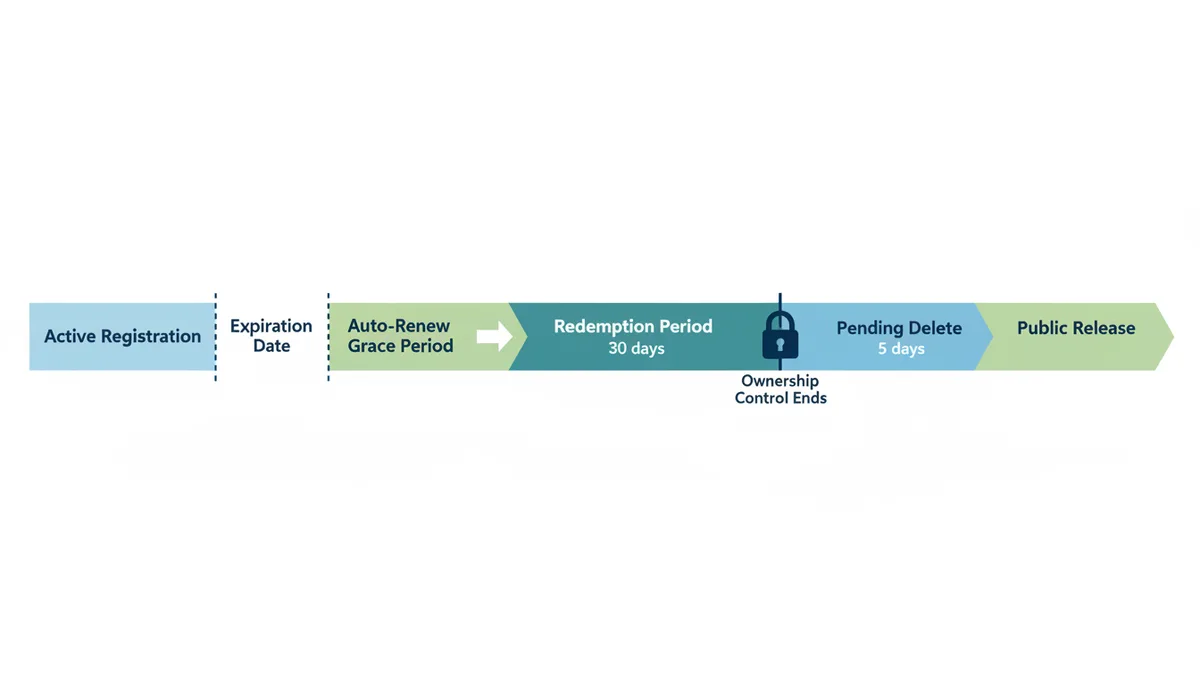
The other family of codes describes the expiration lifecycle, and understanding it changes how you buy expiring names. When a registration lapses, it doesn't vanish. It enters an auto-renew grace window where the registry renews it while the registrar settles up. If the owner still doesn't pay, it falls into redemptionPeriod — roughly 30 days where only the previous owner can restore it, at a fee that commonly runs a hundred dollars or more on top of the renewal. Then pendingDelete: a five-day countdown that nothing can stop, after which the name drops and anyone can register it. The practical payoff: if a domain you want shows pendingDelete, do not negotiate with the "owner" — they have nothing to sell you. Place a backorder with a drop-catching service and try to win it on release.
| Status Code | Plain English Meaning | Implication for a Buyer |
|---|---|---|
| ok | Nothing pending; the registration is in a normal state with no locks or holds | Green light — no action needed before purchase |
| inactive | No name servers are delegated, so the domain resolves nowhere on the internet | Fine if you're buying the name itself; just expect to point it at your own hosting after transfer |
| addPeriod | Registered within the last few days, inside the registry's add grace window | Check whether the "aged premium" was actually registered this week before paying an age premium |
| autoRenewPeriod | Expired, and auto-renewed by the registry while the registrar settles with the owner | Normal post-expiry state — ask whether the owner intends to keep or sell before negotiating |
| clientTransferProhibited | Owner-level lock blocking transfer to another registrar | Standard security — the seller lifts it in their account to complete your transfer; no concern on its own |
| clientUpdateProhibited | Owner-level lock blocking changes to the registration record | Standard security; the seller removes it during the sale so the record can move into your name |
| clientDeleteProhibited | Owner-level lock preventing the domain from being deleted | Harmless protection — nothing for you to clear during a purchase |
| clientHold | The registrar pulled the domain out of DNS, so the website and email stop working | Ask why — often unverified contact details or an unpaid issue the owner must fix before or during the sale |
| serverTransferProhibited | Registry-level transfer lock, often tied to a dispute, UDRP proceeding, or court order | Stop — the domain likely cannot be transferred to you until this is lifted, whatever the seller promises |
| serverUpdateProhibited | Registry-level block on any changes to the record | Serious — the registration can't be updated into your name while this stands; get it explained and cleared first |
| serverDeleteProhibited | Registry-level block preventing the domain from being deleted | Benign alone, sometimes a deliberate high-security lock — but bundled with other server codes, ask what dispute triggered the lockdown |
| serverHold | Registry-level block taking the domain out of DNS, usually over disputes or non-payment | Major red flag — do not proceed until it's explained and cleared |
| redemptionPeriod | Expired and deleted by the registrar; only the last owner can restore it, for a steep fee, within roughly 30 days | The "seller" may no longer control it — verify who can actually deliver before paying anything |
| pendingRestore | A restoration from redemption has been requested but the registry hasn't completed it | Wait until it clears back to ok, and confirm who actually restored the domain |
| pendingDelete | Five-day countdown to public release that cannot be stopped or reversed | Don't buy from anyone — backorder the name and catch the drop when it's released |
| pendingTransfer | A transfer to another registrar is already in progress | Don't pay yet — wait for the transfer to finish, then confirm which registrar and account the domain landed in |
Two closing habits on status codes. Before escrow releases, confirm the record shows only normal codes — ok plus the usual client locks — and that any locks you saw earlier have been explained and lifted as agreed. And the moment the domain lands in your account, set your own clientTransferProhibited lock. The system that protects sellers today should be protecting you tomorrow.
The Future Is Here: Understanding the Shift from WHOIS to RDAP
Everything you've just read was built on a protocol older than the web itself, and its replacement is already running underneath the tools you use. RDAP — the Registration Data Access Protocol — is the modern successor to WHOIS, and if you're going to do this kind of research for years, it's worth knowing what changes.
WHOIS's flaws are architectural. It sends queries in plaintext over an unencrypted connection. It has no standard output format, which is why every registry's raw record looks different and every parsing tool is a pile of special cases. It has no concept of authentication — everyone who asks gets the same answer, which forced the all-or-nothing choice between publishing personal data to the world and redacting it for everyone. GDPR made that choice for the industry, and redaction won.
RDAP was designed to fix each of those. It runs over HTTPS, so queries are encrypted. It returns structured, machine-readable JSON in a standardized schema, so a .com record and a .shop record look the same to software. And it supports differentiated access — a framework where a registry can show one level of detail to anonymous users and richer data to accredited parties like law enforcement or intellectual-property counsel with a legitimate interest. That last piece is the long-term answer to the redaction deadlock: the data isn't gone, it's gated.
This isn't theoretical. ICANN designated 28 January 2025 as the sunset date for the old WHOIS obligation in the generic TLD space: from that date, RDAP is the required, authoritative registration-data service for gTLD registries and registrars. In practice, the web tools you use — including the lookup features on sites like Domain Lookup Tool — increasingly query RDAP behind the scenes and render the same labeled fields either way. Country-code TLDs are moving at their own pace; many still run classic WHOIS and will for a while.
Sources
- ICANN (Internet Corporation for Assigned Names and Numbers) — The fundamental purpose of the WHOIS system, its role in internet governance, and the policies requiring registrants to provide accurate data; also the authoritative source for the WHOIS-to-RDAP transition and related timelines.
- ICANN Lookup Tool — A definitive, official source for performing a WHOIS/RDAP lookup, backing claims about what data is publicly available.
- IETF (Internet Engineering Task Force) RFC 3912 — The technical specification for the WHOIS protocol, providing the authoritative definition of how it works at a protocol level. (Note: claims about Google's use of registration age for ranking should be verified with Google's Search Central documentation.)
- EUR-Lex (Access to European Union law) — The official text of the GDPR, which is the basis for widespread data redaction in WHOIS records by European registrars and for registrants in the EU.
- IANA (Internet Assigned Numbers Authority) — The official list of TLDs and their managing organizations (registries), which is relevant when discussing the different rules for various domain extensions.